|
|
| Line 73: |
Line 73: |
| ## Open the '''Finder Tool''' (press <span style="font-weight: 700; font-size: 15px; color: white; background-color: black;"> Ctrl </span> <span style="font-weight: 700; font-size: 15px; color: white; background-color: black;"> F </span>) and type, in the '''Name''' field, the name of the loco. For example '''SAR T 23''' (or just '''T 23''' should be enough). Click the '''tick''' icon, '''OR''' | | ## Open the '''Finder Tool''' (press <span style="font-weight: 700; font-size: 15px; color: white; background-color: black;"> Ctrl </span> <span style="font-weight: 700; font-size: 15px; color: white; background-color: black;"> F </span>) and type, in the '''Name''' field, the name of the loco. For example '''SAR T 23''' (or just '''T 23''' should be enough). Click the '''tick''' icon, '''OR''' |
| ## Open the '''Driver List''' (bottom left of the screen) and select the loco from there - click the drivers '''Eye''' icon to jump to the loco. | | ## Open the '''Driver List''' (bottom left of the screen) and select the loco from there - click the drivers '''Eye''' icon to jump to the loco. |
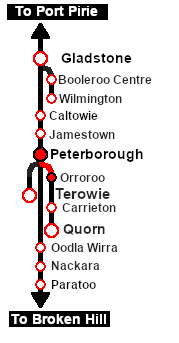
| # Take a few moments to get your bearings. Use the [[image:Line_Index_Label.png|link=SAR_Index|Location Index]] (this link will open in this window) and click on '''Peterborough''' to load its location details and track plans. In each location details page:- | | # Take a few moments to get your bearings. Click [[image:Line_Index_Peterborough.png|link=SAR_Peterborough|Peterborough Data]] (this link will open in this window) to show the location details and track plans for '''Peterborough'''. In each location details page:- |
| #*the [[image:Tab_HM_White.png|link=|75px]] tab gives an overall summary of each location with a "potted" history (where available). | | #*the [[image:Tab_HM_White.png|link=|75px]] tab gives an overall summary of each location with a "potted" history (where available). |
| #*the [[image:Tab_TM_Grey.png|link=|75px]] tab reveals the invisible [[image:Trackmark_Right.png|link=|alt=TM|8px]] '''Track Marks''' for '''Drive To''' commands. | | #*the [[image:Tab_TM_Grey.png|link=|75px]] tab reveals the invisible [[image:Trackmark_Right.png|link=|alt=TM|8px]] '''Track Marks''' for '''Drive To''' commands. |
Revision as of 22:47, 8 November 2021
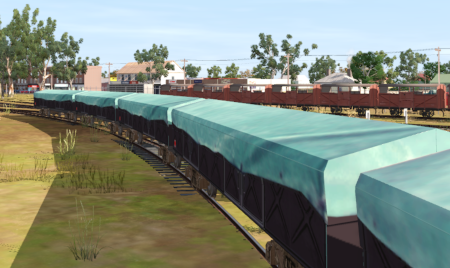
| Empty grain service from Peterborough to Orroroo returning loaded to Peterborough. |
 |
The Historical Bit
October 1988 saw the last revenue services on the Peterborough-Quorn Line before it was permanently closed in November 1988. They were grain runs between Peterborough and Orroroo to clear the grain silos at Orroroo. By that time the main Port Pirie-Broken Hill Line had been converted to standard gauge which isolated the Peterborough-Quorn Line from the rest of the narrow gauge network.
This scenario attempts to recreate something of that service although by 1988 steam had been retired from the line and all services were operated by (most likely) SAR 830 class narrow gauge diesels.
 |
|
Getting Started:
- If you have already closed the opening message window then the first step is to pause the session by pressing the P key.
- Next locate your loco. Either:-
- Open the Finder Tool (press Ctrl F ) and type, in the Name field, the name of the loco. For example SAR T 23 (or just T 23 should be enough). Click the tick icon, OR
- Open the Driver List (bottom left of the screen) and select the loco from there - click the drivers Eye icon to jump to the loco.
- Take a few moments to get your bearings. Click
 (this link will open in this window) to show the location details and track plans for Peterborough. In each location details page:-
- Each location details page has direct links to the adjacent locations so you can explore along the route.
- When you are ready to start, reload the Peterborough Base Session page (click the Scenarios button on your current location page) and select this Scenario again or just use the Back button on your browser - whichever is quicker.
- Switch back to TRS19 Driver and either close the opening message window or press the P key to start the session.
|
|
Tutorial:
 |
A tutorial on using these scenarios is provided in the link on the left. The link will open in this window |
|
|
Tasks:
- Move your selected loco onto the Peterborough Grain & Flour Mill Siding and couple to the WHE wagons stored there.
- Move the train onto the Main Line and then onto the Peterborough-Quorn Line. Proceed to Orroroo.
- At Orroroo move the train onto the Goods road to the Grain Silos for loading. Notes:
- stop the WHE wagons and DB van so that they are clear of the Goods Crane .
- the WHE wagons are not industry enabled and will not actually load but because they are covered this issue will not be noticeable.
- Run the loco around the train to attach to the DB guard van at its rear.
- Detach the DB van from the WHE wagons and shunt the van onto the Goods Loop . Position it alongside the Goods Shed.
- Turn the loco on the WYE . Notes:
- The WYE was actually removed in the 1930s so in reality the loco would have to run "tender first" back to Peterborough - which was not popular with the train crews but is an option you can use.
- If you have selected the Garrett Loco SAR 407 for this scenario then it will be too long to turn on the WYE .
- Coal and water (if needed) at the Orroroo Loco Coal & Water Stage.
- Attach the loco to the southern (Peterborough) end of the WHE wagons at the Grain Silos .
- Shunt the train onto the Goods Loop and couple it to the DB van.
- Proceed to a vacant yard road at Peterborough.
- Run the loco around the train and attach to the DB van at its rear.
- Shunt the DB van onto a vacant road in the Car Shed.
- Reattach to the WHE wagons and shunt the train to the Peterborough Grain & Flour Mill Siding.
- Detach the loco and return it to the Main Loco Depot.
|
Driving Notes:
- You do not have the authority to enter the Orroroo-Eurelia section of the line. All shunting movements at Orroroo are restricted to the yard area.
- The approaches to all locations are protected by invisible signals to prevent the AI Half Speed Slowdown Problem when approaching a signal at stop.
- Trackmarks and industries have been provided for AI Drive To Trackmark, Drive via Trackmark and Drive to Industry commands. Click
 for details.
- Manual (no AI) driving is possible. As a visual driving aid, a Caution warning sign has been placed at the location of the Main Approach Dn and Main Approach Up trackmarks. Click for details.
|
|
|
|
This page was created by Trainz user pware in March 2021 and was last updated as shown below.