SAR Scenario Peterborough Shunter: Difference between revisions
From TrainzOnline
Jump to navigationJump to search
mNo edit summary |
mNo edit summary |
||
| Line 92: | Line 92: | ||
</table> <!-- END Blue Border for Tutorial table --> | </table> <!-- END Blue Border for Tutorial table --> | ||
<br> | <br> | ||
<table width=1000> <!-- BEGIN Yard (if | <table width=1000> <!-- BEGIN Yard (if applicable), Orders, Strip Map and Driving Notes tables --> | ||
<tr valign="top"> | <tr valign="top"> | ||
<td> | <td> | ||
<table bgcolor= | <table bgcolor=#000000 width=820 cellpadding=2> <!-- BEGIN Black Border for Yard Table --> | ||
<tr valign="top"> | <tr valign="top"> | ||
<td> | <td><span style="font-size: 15px; font-weight: 700; color: white">Yard Map:</span><br> | ||
<span style="font-size: 15px; font-weight: 700; color: white | <table bgcolor=#ffffff width=816> <!-- BEGIN Yard Table --> | ||
< | |||
<tr valign="top"> | <tr valign="top"> | ||
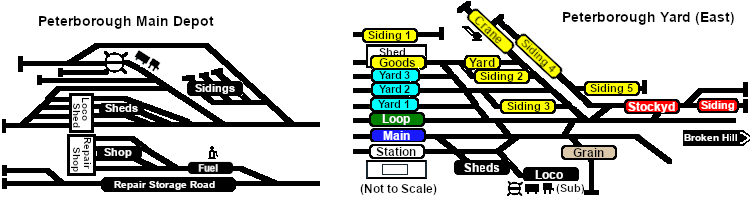
<td align="center">[[image:SAR_Peterborough_Yards.png|link=|alt=Yard map]]</td> | <td align="center">[[image:SAR_Peterborough_Yards.png|link=|alt=Yard map]]</td> | ||
| Line 106: | Line 105: | ||
<td> </td> | <td> </td> | ||
</tr> | </tr> | ||
</table> | </table> <!-- END Yard Table --> | ||
</td> | |||
</tr> | |||
</table> <!-- END Black Border for Yard Table --> | |||
<br> | <br> | ||
<table bgcolor=# | <table bgcolor=#000000 width=820 cellpadding=2> <!-- BEGIN Black Border for Orders Table --> | ||
<tr valign="top"> | <tr valign="top"> | ||
<td> | <td><span style="font-size: 15px; font-weight: 700; color: white">Orders:</span><br> | ||
<table width= | <table bgcolor=#e8e8e8 width=816> <!-- BEGIN Orders and Logo Table --> | ||
<tr valign="top"> | <tr valign="top"> | ||
<td width= | <td width=716> | ||
# Move the loco out of the <span style="font-weight: 700;"><span style="color: white; background-color: black;"> Loco </span> Depot</span> and navigate through to the other side of '''Peterborough Yard''' onto the <span style="font-weight: 700; color: white; background-color: red;"> Stockyard </span> road. | # Move the loco out of the <span style="font-weight: 700;"><span style="color: white; background-color: black;"> Loco </span> Depot</span> and navigate through to the other side of '''Peterborough Yard''' onto the <span style="font-weight: 700; color: white; background-color: red;"> Stockyard </span> road. | ||
# Reverse onto <span style="font-weight: 700; color: black; background-color: yellow;"> Goods Siding 4 </span> and attach to the rake of empty '''MTW''' flat wagons stored there. | # Reverse onto <span style="font-weight: 700; color: black; background-color: yellow;"> Goods Siding 4 </span> and attach to the rake of empty '''MTW''' flat wagons stored there. | ||
| Line 128: | Line 130: | ||
<td width=100>[[image:SAR Train Order Rotated.png|100px|link=|alt=Logo]]</td> | <td width=100>[[image:SAR Train Order Rotated.png|100px|link=|alt=Logo]]</td> | ||
</tr> | </tr> | ||
</table> | </table> <!-- END Orders and Logo Table --> | ||
</td> | </td> | ||
</tr> | </tr> | ||
</table> | </table> <!-- END Black Border for Orders Table --> | ||
<br> | <br> | ||
<table cellpadding="2" bgcolor="black" width=820> <!-- BEGIN Black border for Driving Notes sub table --> | <table cellpadding="2" bgcolor="black" width=820> <!-- BEGIN Black border for Driving Notes sub table --> | ||
Revision as of 06:49, 21 June 2022
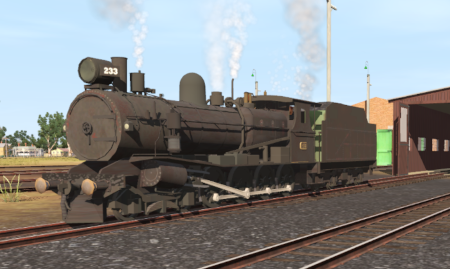
| Shunting operations that cover the length of Peterborough Yard and Peterborough Depot. |  |
 |
|
||||||||||


Getting Started:
|

Tutorial:
|

|
|




This page was created by Trainz user pware in February 2021 and was last updated as shown below.


