SAR Scenario Depot Fuel Run: Difference between revisions
From TrainzOnline
Jump to navigationJump to search
mNo edit summary |
mNo edit summary |
||
| Line 34: | Line 34: | ||
<td><span style="font-size: 15px; font-weight: 700; color: white; background-color: black;"> Loco: </span></td> | <td><span style="font-size: 15px; font-weight: 700; color: white; background-color: black;"> Loco: </span></td> | ||
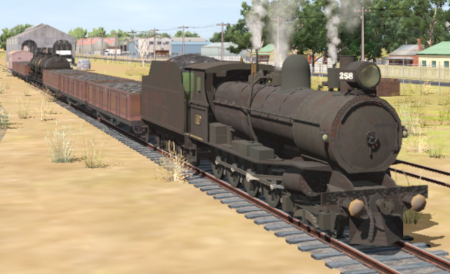
<td>'''[[SAR_Scenario_Rolling_Stock#SAR_T_Class|SAR T 258]]''' on <span style="font-weight: 700;">Gladstone <span style="color: black; background-color: yellow;"> Goods Loop </span></span><br> | <td>'''[[SAR_Scenario_Rolling_Stock#SAR_T_Class|SAR T 258]]''' on <span style="font-weight: 700;">Gladstone <span style="color: black; background-color: yellow;"> Goods Loop </span></span><br> | ||
'''Other | '''Other Available Locos:''' [[image:Loco_Roster_Label.png|link=SAR Peterborough Division Loco Roster]] | ||
*'''[[SAR_Scenario_Rolling_Stock#SAR_T_Class|SAR T 210]]''' at <span style="font-weight: 700;">Gladstone <span style="color: white; background-color: black;"> Loco </span> Depot</span></td> | *'''[[SAR_Scenario_Rolling_Stock#SAR_T_Class|SAR T 210]]''' at <span style="font-weight: 700;">Gladstone <span style="color: white; background-color: black;"> Loco </span> Depot</span></td> | ||
</tr> | </tr> | ||
| Line 77: | Line 77: | ||
# Each location details page has direct links to the adjacent locations so you can explore along the route. | # Each location details page has direct links to the adjacent locations so you can explore along the route. | ||
# When you are ready to start, reload the '''Peterborough Base Session''' page (click the '''Scenarios''' button on your current location page) and select this '''Scenario''' again or just use the '''Back''' button on your browser - whichever is quicker. | # When you are ready to start, reload the '''Peterborough Base Session''' page (click the '''Scenarios''' button on your current location page) and select this '''Scenario''' again or just use the '''Back''' button on your browser - whichever is quicker. | ||
# Switch back to ''' | # Switch back to '''Driver Mode''' and either close the opening message window or press the <span style="font-weight: 700; font-size: 15px; color: white; background-color: black;"> P </span> key to start the session. | ||
</td> | </td> | ||
</tr> | </tr> | ||
| Line 203: | Line 203: | ||
<td><span style="font-size: 15px; font-weight: 700; color: white; background-color: black;"> Loco: </span></td> | <td><span style="font-size: 15px; font-weight: 700; color: white; background-color: black;"> Loco: </span></td> | ||
<td>'''[[SAR_Scenario_Rolling_Stock#SAR_T_Class|SAR T 258]]''' on <span style="font-weight: 700;">Gladstone <span style="color: black; background-color: yellow;"> Goods Loop </span></span><br> | <td>'''[[SAR_Scenario_Rolling_Stock#SAR_T_Class|SAR T 258]]''' on <span style="font-weight: 700;">Gladstone <span style="color: black; background-color: yellow;"> Goods Loop </span></span><br> | ||
'''Other | '''Other Available Locos:''' [[image:Loco_Roster_Label.png|link=SAR Peterborough Division Loco Roster]] | ||
*'''[[SAR_Scenario_Rolling_Stock#SAR_T_Class|SAR T 210]]''' at <span style="font-weight: 700;">Gladstone <span style="color: white; background-color: black;"> Loco </span> Depot</span></td> | *'''[[SAR_Scenario_Rolling_Stock#SAR_T_Class|SAR T 210]]''' at <span style="font-weight: 700;">Gladstone <span style="color: white; background-color: black;"> Loco </span> Depot</span></td> | ||
</tr> | </tr> | ||
| Line 246: | Line 246: | ||
# Each location details page has direct links to the adjacent locations so you can explore along the route. | # Each location details page has direct links to the adjacent locations so you can explore along the route. | ||
# When you are ready to start, reload the '''Peterborough Base Session''' page (click the '''Scenarios''' button on your current location page) and select this '''Scenario''' again or just use the '''Back''' button on your browser - whichever is quicker. | # When you are ready to start, reload the '''Peterborough Base Session''' page (click the '''Scenarios''' button on your current location page) and select this '''Scenario''' again or just use the '''Back''' button on your browser - whichever is quicker. | ||
# Switch back to ''' | # Switch back to '''Driver Mode''' and either close the opening message window or press the <span style="font-weight: 700; font-size: 15px; color: white; background-color: black;"> P </span> key to start the session. | ||
</td> | </td> | ||
</tr> | </tr> | ||
Revision as of 07:32, 25 June 2022
| Error creating thumbnail: /bin/bash: line 1: /usr/bin/convert: No such file or directory Error code: 127 | 1 Gladstone to Peterborough Depot Fuel Run | Error creating thumbnail: /bin/bash: line 1: /usr/bin/convert: No such file or directory Error code: 127 |
| A scenario in the SAR Peterborough Base Session | ||
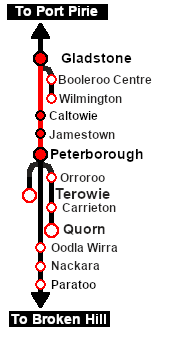
| Loco coal stages and fuel-oil points need to be refilled regularly. This service delivers coal to the loco coal stages at Jamestown and Peterborough, and bunker c oil (for the SAR 400 class Garrett locos) to the loco (main) depot at Peterborough. |  |
 |
|
||||||||||||


Getting Started:
|

Tutorial:
|

|
|




This page was created by Trainz user pware in February 2021 and was last updated as shown below.


