SAR Scenario Booleroo Passenger: Difference between revisions
From TrainzOnline
Jump to navigationJump to search
mNo edit summary |
mNo edit summary |
||
| Line 32: | Line 32: | ||
<tr valign="top"> | <tr valign="top"> | ||
<td><span style="font-size: 15px; font-weight: 700; color: white; background-color: black;"> Loco: </span></td> | <td><span style="font-size: 15px; font-weight: 700; color: white; background-color: black;"> Loco: </span></td> | ||
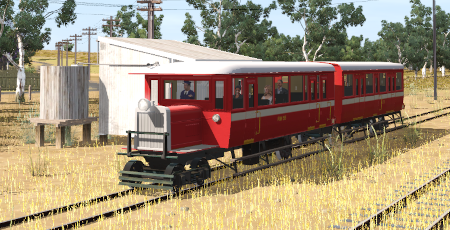
<td>'''[[SAR Scenario Rolling Stock#QR RM|RM55 (Rail Motor)]]''' at '''Gladstone Depot <span style="color: white; background-color: black;"> Loco Shed </span> | <td>'''[[SAR Scenario Rolling Stock#QR RM|RM55 (Rail Motor)]]''' at '''Gladstone Depot <span style="color: white; background-color: black;"> Loco Shed </span>'''</td> | ||
</tr> | </tr> | ||
<tr valign="top"> | <tr valign="top"> | ||
| Line 65: | Line 64: | ||
# If you have already closed the opening message window then the first step is to pause the session by pressing the <span style="font-weight: 700; font-size: 15px; color: white; background-color: black;"> P </span> key. | # If you have already closed the opening message window then the first step is to pause the session by pressing the <span style="font-weight: 700; font-size: 15px; color: white; background-color: black;"> P </span> key. | ||
# Next locate your loco. '''Either''':- | # Next locate your loco. '''Either''':- | ||
## Open the '''Finder Tool''' (press <span style="font-weight: 700; font-size: 15px; color: white; background-color: black;"> Ctrl </span> <span style="font-weight: 700; font-size: 15px; color: white; background-color: black;"> F </span>) and type, in the '''Name''' field, the name of the loco | ## Open the '''Finder Tool''' (press <span style="font-weight: 700; font-size: 15px; color: white; background-color: black;"> Ctrl </span> <span style="font-weight: 700; font-size: 15px; color: white; background-color: black;"> F </span>) and type, in the '''Name''' field, the name of the loco - in this case '''RM55'''. Click the '''tick''' icon, '''OR''' | ||
## Open the '''Driver List''' (bottom left of the screen) and | ## Open the '''Driver List''' (bottom left of the screen) and scroll through the driver names to find '''Driver 55'''. Click the '''Eye''' for '''Driver 55''' to jump to the loco. | ||
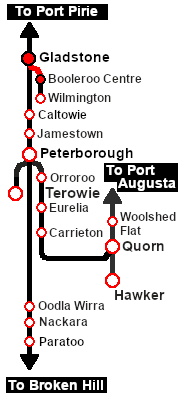
# Take a few moments to get your bearings. Click [[image:Line_Index_Gladstone.png|link=SAR_Gladstone|Gladstone Data]] (this link will open in this window) to show the location details and track plans for '''Gladstone'''. In each location details page:- | # Take a few moments to get your bearings. Click [[image:Line_Index_Gladstone.png|link=SAR_Gladstone|Gladstone Data]] (this link will open in this window) to show the location details and track plans for '''Gladstone'''. In each location details page:- | ||
#*the [[image:Tab_HM_White.png|link=|75px]] tab gives an overall summary of each location with a "potted" history (where available). | #*the [[image:Tab_HM_White.png|link=|75px]] tab gives an overall summary of each location with a "potted" history (where available). | ||
| Line 104: | Line 103: | ||
<tr valign="top"> | <tr valign="top"> | ||
<td width=716> | <td width=716> | ||
# Reverse the | # Reverse the consist from the '''Gladstone''' Depot <span style="color: white; background-color: black; font-weight: 700;"> Loco Shed </span> into '''Gladstone''' <span style="font-weight: 700; color: black; background-color: white;"> Station </span>. | ||
# Drive to '''Booleroo Centre''' stopping at '''Laura''', '''Stone Hut''' and '''Wirrabara''' as shown in the timetable. | # Drive to '''Booleroo Centre''' stopping at '''Laura''', '''Stone Hut''' and '''Wirrabara''' as shown in the timetable. | ||
# After arriving at '''Booleroo Centre''', turn the train on the <span style="color: white; background-color: black; font-weight: 700;"> WYE </span> and reverse back to the <span style="font-weight: 700; color: black; background-color: white;"> Station </span>. | # After arriving at '''Booleroo Centre''', turn the train on the <span style="color: white; background-color: black; font-weight: 700;"> WYE </span> and reverse back to the <span style="font-weight: 700; color: black; background-color: white;"> Station </span>. | ||
# '''Option:''' Return to '''Gladstone''' stopping at '''Wirrabara''', '''Stone Hut''' and '''Laura''' as per the timetable and return the | # '''Option:''' Return to '''Gladstone''' stopping at '''Wirrabara''', '''Stone Hut''' and '''Laura''' as per the timetable and return the consist to the Depot <span style="color: white; background-color: black; font-weight: 700;"> Loco Shed </span>, after turning on the turntable. | ||
<table bgcolor="black" width=700> <!-- BEGIN Timetable black border --> | <table bgcolor="black" width=700> <!-- BEGIN Timetable black border --> | ||
<tr valign="top"> | <tr valign="top"> | ||
Revision as of 07:15, 21 August 2022
| Error creating thumbnail: /bin/bash: line 1: /usr/bin/convert: No such file or directory Error code: 127 | 16 Gladstone - Booleroo Centre Passenger | Error creating thumbnail: /bin/bash: line 1: /usr/bin/convert: No such file or directory Error code: 127 |
| A scenario in the SAR Peterborough Base Session v2.0 | ||
| A morning passenger run from Gladstone to Booleroo Centre and return using a Rail Motor and Trailer. |  |
 |
|
||||||||||||


Getting Started:
|

Tutorial:
|

|
|





This page was created by Trainz user pware in February 2021 and was last updated as shown below.


