SAR Scenario Wilmington Freight: Difference between revisions
mNo edit summary |
mNo edit summary |
||
| Line 1: | Line 1: | ||
<!-- | <!-- V1.0 --> | ||
<table width=1000> <!-- BEGIN Title table --> | <table width=1000> <!-- BEGIN Title table --> | ||
<tr valign="top"> | <tr valign="top"> | ||
| Line 85: | Line 85: | ||
# Next locate your loco. '''Either''':- | # Next locate your loco. '''Either''':- | ||
#*Open the '''Finder Tool''' (press <span style="font-weight: 700; font-size: 15px; color: white; background-color: black;"> Ctrl </span> <span style="font-weight: 700; font-size: 15px; color: white; background-color: black;"> F </span>) and type, in the '''Name''' field, the name of the loco, in this case '''SAR T 257''' (or just '''T 257''' should be enough). Click the '''tick''' icon, '''OR''' | #*Open the '''Finder Tool''' (press <span style="font-weight: 700; font-size: 15px; color: white; background-color: black;"> Ctrl </span> <span style="font-weight: 700; font-size: 15px; color: white; background-color: black;"> F </span>) and type, in the '''Name''' field, the name of the loco, in this case '''SAR T 257''' (or just '''T 257''' should be enough). Click the '''tick''' icon, '''OR''' | ||
#*Open the '''Driver List''' (bottom left of the screen) and then scroll through the list to find the '''loco name''' ('''SAR T 257''') then click the drivers '''Eye''' icon [[image:Driver_Eye.png|link=]] to take control of the loco | #*Open the '''Driver List''' (bottom left of the screen) and then scroll through the list to find the '''loco name''' ('''SAR T 257''') then click the drivers '''Eye''' icon [[image:Driver_Eye.png|link=]] to take control of the loco | ||
# Take a few moments to get your bearings. Click [[image:Line_Index_Gladstone.png|link=SAR_Gladstone|Gladstone Data]] (this link will open in this window) to show the location details and track plans for '''Gladstone'''. In each location details page:- | # Take a few moments to get your bearings. Click [[image:Line_Index_Gladstone.png|link=SAR_Gladstone|Gladstone Data]] (this link will open in this window) to show the location details and track plans for '''Gladstone'''. In each location details page:- | ||
#*the [[image:Tab_HM_White.png|link=|75px]] tab gives an overall summary of each location with a "potted" history (where available). | #*the [[image:Tab_HM_White.png|link=|75px]] tab gives an overall summary of each location with a "potted" history (where available). | ||
Revision as of 20:30, 13 October 2022
| Error creating thumbnail: /bin/bash: line 1: /usr/bin/convert: No such file or directory Error code: 127 | 3 Gladstone to Wilmington Local Freight | Error creating thumbnail: /bin/bash: line 1: /usr/bin/convert: No such file or directory Error code: 127 |
| A scenario in the SAR Peterborough Base Session | ||
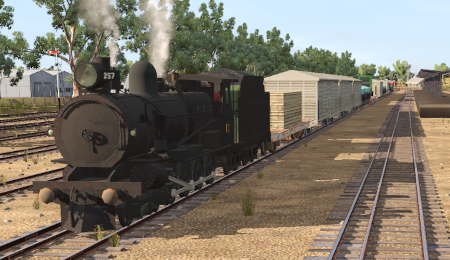
| A twice weekly freight service from Gladstone to Wilmington dropping wagons at locations as required. |  |
The Historical Bit
The 1964 Working Timetable for the Wilmington Line contained only two regular freight services through to Wilmington, running on Mondays and Fridays only. An additional service to Wilmington ran only "if required". On Wednesdays there was a freight service to Booleroo Centre, with two additional services available "if required".
The line had no signals beyond Gladstone Yard. Train order working was in operation on the line.
The 1982 working timetable consisted of a single freight service to Wilmington each week (on Fridays). The line was closed in 1990 and the track has since been removed.
 |
|
|||||||||||

|
|
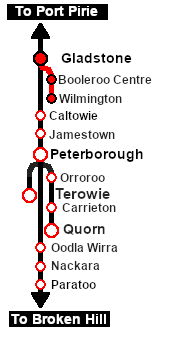
Each location in the layout has a detailed set of track diagrams that provide a variety of useful information The Getting Started guide below gives a summary of what is available.  graphic, or go to the bottom of the page for all the session links (all links will open in this window). |

Getting Started:
|


Tutorial:
|

|
|





This page was created by Trainz user pware in February 2021 and was last updated as shown below.


