How to Use Message Popup Rule: Difference between revisions
mNo edit summary |
mNo edit summary |
||
| Line 1: | Line 1: | ||
The information in this Wiki Page applies to '''TANE''', '''TRS19''', '''Trainz Plus''' and '''TRS22'''. This page describes how to configure the '''Message Popup Rule'''. | The information in this Wiki Page applies to '''TANE''', '''TRS19''', '''Trainz Plus''' and '''TRS22'''. This page describes how to configure the '''Message Popup Rule'''. | ||
<table cellpadding= | <table cellpadding=2 bgcolor="Aquamarine"> | ||
<tr valign="top"> | <tr valign="top"> | ||
<td>[[image:LinkWiki.PNG|link=]]</td> | <td>[[image:LinkWiki.PNG|link=]]</td> | ||
| Line 32: | Line 32: | ||
='''Add a Message Popup Rule'''= | ='''Add a Message Popup Rule'''= | ||
<table cellpadding= | <table cellpadding=2 bgcolor=#c1e7e7> | ||
<tr valign="top"> | <tr valign="top"> | ||
<td>[[image:DotPoint.JPG|link=]]</td> | <td>[[image:DotPoint.JPG|link=]]</td> | ||
| Line 125: | Line 125: | ||
</table> | </table> | ||
<br> | <br> | ||
<table cellpadding= | <table cellpadding=2 bgcolor="Aquamarine"> | ||
<tr valign="top"> | <tr valign="top"> | ||
<td>[[image:LinkWiki.PNG|link=]]</td> | <td>[[image:LinkWiki.PNG|link=]]</td> | ||
| Line 137: | Line 137: | ||
</table> | </table> | ||
<br> | <br> | ||
<table width=1000 cellpadding= | <table width=1000 cellpadding=2 bgcolor=#eeeeee> | ||
<tr> | <tr> | ||
<td colspan="2"> | <td colspan="2"> | ||
| Line 212: | Line 212: | ||
</table> | </table> | ||
<br> | <br> | ||
<table cellpadding= | <table cellpadding=2 bgcolor="Aquamarine"> | ||
<tr valign="top"> | <tr valign="top"> | ||
<td>[[image:LinkWiki.PNG|link=]]</td> | <td>[[image:LinkWiki.PNG|link=]]</td> | ||
| Line 235: | Line 235: | ||
The settings shown in this example will direct Trainz to load the message from a HTML file in a HTML asset. | The settings shown in this example will direct Trainz to load the message from a HTML file in a HTML asset. | ||
<table> | <table width=1000> | ||
<tr> | <tr> | ||
<td valign="top">[[image:MessagePopup1.JPG|link=]]<br><br> | <td valign="top">[[image:MessagePopup1.JPG|link=]]</td> | ||
<table cellpadding= | <td valign="top"> | ||
<table bgcolor=#000000 cellpadding=2> | |||
<tr valign="top"> | |||
<td> | |||
<table bgcolor=#ffffb0 cellpadding=2> | |||
<tr valign="top"> | |||
<td width=25>[[image:NotePad.PNG|link=]]</td> | |||
<td><span style="font-size: 17px;">'''Notes:'''</span><br> | |||
---- | |||
</td> | |||
</tr> | |||
<tr valign="top"> | |||
<td>[[image:DotPoint.JPG|10px|link=]]</td> | |||
<td>Knowledge of HTML, as used by Trainz, will '''probably''' be required for this option</td> | |||
</tr> | |||
<tr valign="top"> | |||
<td>[[image:DotPoint.JPG|10px|link=]]</td> | |||
<td>The HTML page (with filename extension ".html") must be in a Trainz asset of type HTML</td> | |||
</tr> | |||
<tr valign="top"> | |||
<td>[[image:DotPoint.JPG|10px|link=]]</td> | |||
<td>Graphics and a limited set of HTML effects are possible</td> | |||
</tr> | |||
<tr valign="top"> | |||
<td>[[image:DotPoint.JPG|10px|link=]]</td> | |||
<td>The sound file settings '''HTML Wave''' and '''Wave Name''' are optional</td> | |||
</tr> | |||
<tr valign="top"> | |||
<td>[[image:DotPoint.JPG|10px|link=]]</td> | |||
<td>If a sound file is to be played when the message is displayed then it must be of type WAV (with filename extension ".wav") and must be in a Trainz asset of type HTML. It does not have to be in the same HTML asset as the HTML page</td> | |||
</tr> | |||
</table> | |||
</td> | |||
</tr> | |||
</table> | |||
<br> | |||
<table cellpadding=2 bgcolor="Aquamarine"> | |||
<tr valign="top"> | <tr valign="top"> | ||
<td>[[image:LinkWiki.PNG|link=]]</td> | <td>[[image:LinkWiki.PNG|link=]]</td> | ||
| Line 245: | Line 281: | ||
* '''[[How to Create a HTML Asset]]'''</td> | * '''[[How to Create a HTML Asset]]'''</td> | ||
</tr> | </tr> | ||
</table></td> | </table> | ||
< | </td> | ||
<table cellpadding= | </tr> | ||
</table> | |||
<br> | |||
<table width=1000 cellpadding=2 bgcolor=#eeeeee> | |||
<tr> | <tr> | ||
<td colspan="2"> | <td colspan="2"> | ||
| Line 254: | Line 293: | ||
<tr valign="top"> | <tr valign="top"> | ||
<td>[[image:Gears.PNG|link=]]</td> | <td>[[image:Gears.PNG|link=]]</td> | ||
<td><span style="font-size: 17px;">'''Settings:'''</span>< | <td><span style="font-size: 17px;">'''Settings:'''</span> Shown in the example above:- | ||
[[image:PortalOptionButtonFilled.PNG|link=]] '''A pre-defined HTML page (advanced)'''< | <table> | ||
<tr valign="top"> | |||
<td>[[image:PortalOptionButtonFilled.PNG|link=]] '''A pre-defined HTML page (advanced)'''</td> | |||
</tr> | |||
<tr valign="top"> | |||
<td>[[image:CheckBox.PNG|link=]] '''Pause game while message is displayed''' - this will halt the game play until the window is closed. This may be needed if you have a long introductory HTML information page, otherwise leave unchecked</td> | |||
</tr> | |||
<tr valign="top"> | |||
<td>[[image:CheckBox.PNG|link=]] '''Close previous message popup windows''' - this is usually a good idea unless you want multiple message windows open</td> | |||
</tr> | |||
<tr valign="top"> | |||
<td>'''Message location:''' '''<span style="text-decoration: underline;">Top left</span>''' of the screen has been chosen as the location for the message window. Other positions are '''Top right''', '''Bottom left''' and '''Bottom right'''</td> | |||
</tr> | |||
<tr valign="top"> | |||
<td>'''HTML Asset:''' '''<span style="text-decoration: underline;">General Purpose Session HTML</span>''' one of the HTML assets installed with '''Trainz'''</td> | |||
</tr> | </tr> | ||
<tr> | <tr valign="top"> | ||
<td | <td>'''HTML Page:''' '''<span style="text-decoration: underline;">right_away.html</span>''' which is a HTML file inside the '''<span style="text-decoration: underline;">General Purpose Session HTML</span>''' asset</td> | ||
</tr> | </tr> | ||
<tr valign="top"> | <tr valign="top"> | ||
<td> | <td>'''HTML Wave:''' '''<span style="text-decoration: underline;">General Purpose Session HTML</span>''' HTML asset contains the ''optional'' sound file to be played</td> | ||
< | </tr> | ||
<tr valign="top"> | <tr valign="top"> | ||
<td> | <td>'''Wav Name:''' '''<span style="text-decoration: underline;">all-aboard.wav</span>''' is the ''optional'' sound file to be played</td> | ||
</tr> | </tr> | ||
< | <tr valign="top"> | ||
<td>[[image:CheckBox.PNG|link=]] '''Autoplay Wav''' - the sound will be played when the page is displayed</td> | |||
</tr> | </tr> | ||
</table> | </table> | ||
</td> | </td> | ||
</tr> | |||
<tr> | |||
<td colspan="2"> | |||
----</td> | |||
</tr> | </tr> | ||
</table> | </table> | ||
| Line 310: | Line 349: | ||
<td>[[image:MessagePopup4.JPG|link=]]</td> | <td>[[image:MessagePopup4.JPG|link=]]</td> | ||
<td> | <td> | ||
<table cellpadding= | <table cellpadding=2 bgcolor=#eeeeee> | ||
<tr> | <tr> | ||
<td colspan="2"> | <td colspan="2"> | ||
| Line 338: | Line 377: | ||
<tr valign="top"> | <tr valign="top"> | ||
<td> | <td> | ||
<table cellpadding= | <table cellpadding=2 bgcolor=#ffffb0> | ||
<tr valign="top"> | <tr valign="top"> | ||
<td>[[image:NotePad.PNG|link=]]</td> | <td>[[image:NotePad.PNG|link=]]</td> | ||
| Line 361: | Line 400: | ||
...which will produce the message "'''You are running late!'''" from the '''Message Popup Rule''' settings shown above. | ...which will produce the message "'''You are running late!'''" from the '''Message Popup Rule''' settings shown above. | ||
<br> | <br> | ||
<table cellpadding= | <table cellpadding=2 bgcolor="Aquamarine"> | ||
<tr valign="top"> | <tr valign="top"> | ||
<td>[[image:LinkWiki.PNG|link=]]</td> | <td>[[image:LinkWiki.PNG|link=]]</td> | ||
| Line 377: | Line 416: | ||
='''Alternatives to the Message Popup Rule'''= | ='''Alternatives to the Message Popup Rule'''= | ||
<table cellpadding= | <table cellpadding=2 bgcolor=#ffffff> | ||
<tr valign="top"> | <tr valign="top"> | ||
<td width="58">[[image:RulesWiki.PNG|link=]]</td> | <td width="58">[[image:RulesWiki.PNG|link=]]</td> | ||
| Line 389: | Line 428: | ||
='''Related Links'''= | ='''Related Links'''= | ||
<table cellpadding= | <table cellpadding=2 bgcolor=#ffffff> | ||
<tr valign="top"> | <tr valign="top"> | ||
<td>[[image:LinkWiki.PNG|link=]]</td> | <td>[[image:LinkWiki.PNG|link=]]</td> | ||
| Line 413: | Line 452: | ||
='''Trainz Wiki'''= | ='''Trainz Wiki'''= | ||
<table cellpadding= | <table cellpadding=2 bgcolor=#ffffff> | ||
<tr valign="top"> | <tr valign="top"> | ||
<td>[[image:TrainzWiki.png|link=]]</td> | <td>[[image:TrainzWiki.png|link=]]</td> | ||
Revision as of 22:16, 19 September 2023
The information in this Wiki Page applies to TANE, TRS19, Trainz Plus and TRS22. This page describes how to configure the Message Popup Rule.
 |
For examples of how to use this rule in Sessions see the Trainz Wiki Page at:- |
Workflow Diagram 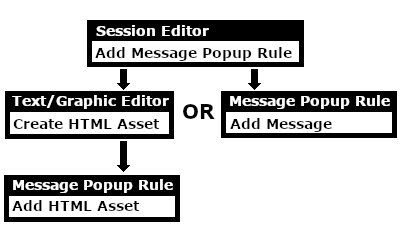 |
 |
 |
 |
Add a Message Popup Rule
 |
The Message Popup Rule is a Trainz Session Rule that creates onscreen messages for users in Driver Mode. |
The Message Popup Rule is added to a Session and configured using the  Session Editor in Surveyor. The rule will open a browser window on the screen in Driver Mode that will remain on the screen until it is closed by the user or by another rule. |
|
||||||||


|
 |
|
|
Using a Custom Message
The settings shown in this example will direct Trainz to load the message from text entered in the Custom Message box.
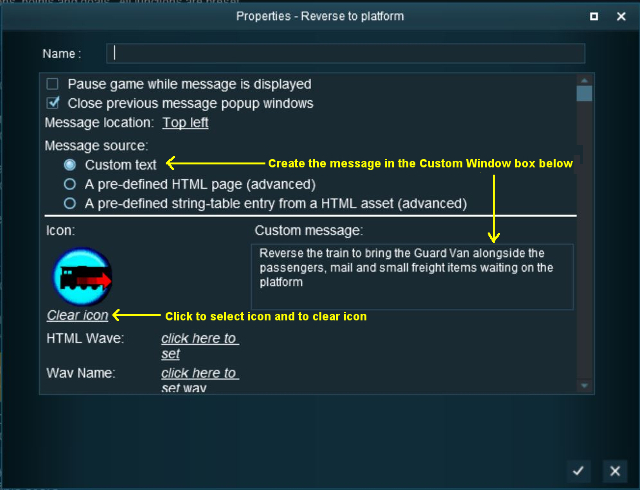 |
|
|||||||||||||||

|
|
|||||||
 |
Settings: Shown in the example above:-
|
||||||
|
|
|||||||


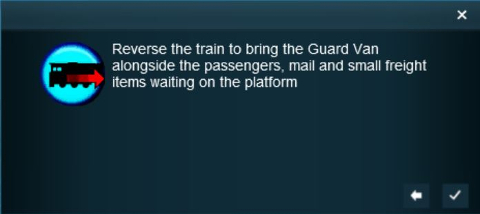 |
The custom message popup created by the example shown above |
|
||||||||||

|
For information on how to create your own Message Popup Icons, see the Trainz Wiki Page at:- |
|
|
|
|
Using a HTML Page
The settings shown in this example will direct Trainz to load the message from a HTML file in a HTML asset.
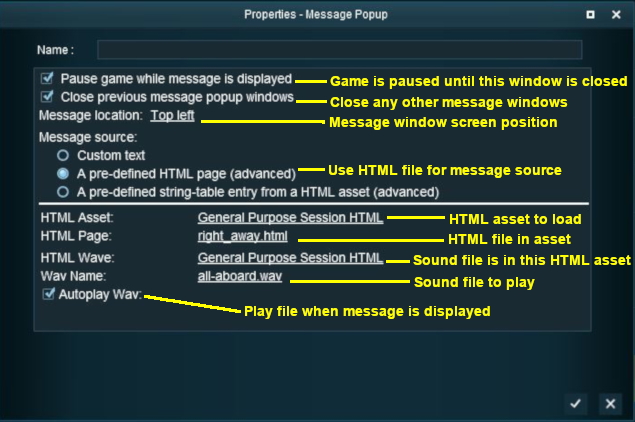 |
|
|
|
||||||||||
|
Settings: Shown in the example above:-
|
|||||||||
|
|
||||||||||
|
|
|
|
Using a String-Table Message
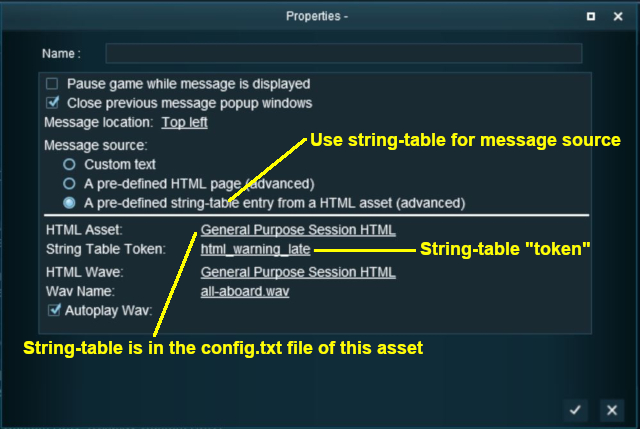
The settings shown in this example will direct Trainz to load the message from text stored in the config.txt string table of a specified HTML asset.
 |
|
|||||||||
For example, the config.txt file of the asset General Purpose Session HTML contains the following:-
string-table
    {
        html_warning_late       "You are running late!"
    }
...which will produce the message "You are running late!" from the Message Popup Rule settings shown above.
|
For more information, see the Trainz Wiki Page at:- |
|
Alternatives to the Message Popup Rule
 |
There are other HTML message window rules that are alternatives to the Message Popup rule. A few possibilities are:- |
Related Links
|
|
|
Trainz Wiki
 |
More Tutorials and Guides to Using Trainz |
This page was created by Trainz user pware in April 2018 and was last updated as shown below.

