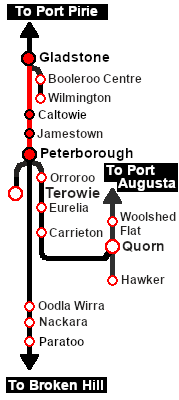
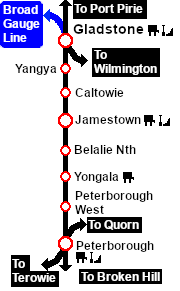
|
|
| Line 64: |
Line 64: |
| </table> <!-- END Scenario image and loco/consist table --> | | </table> <!-- END Scenario image and loco/consist table --> |
|
| |
|
| <span style="font-weight: 700; font-size: 15px; color: white; background-color: black;"> DLS Session Based on This Scenario </span><br> | | <table width=1000> |
| <br>
| | <tr valign="top"> |
| This is a fully directed session involving '''Navigation Points''' and '''Message Popups'''. Most junction switches will be set for you.<br>
| | <td><span style="font-weight: 700; font-size: 15px; color: white; background-color: black;"> DLS Session Based on This Scenario </span><br> |
| <br>
| |
| <span style="font-weight: 700;"><kuid:45176:109304> <span style="color: blue;">SAR Northern Division Depot Fuel Run</span></span>.<br>
| |
| <br> | |
|
| |
|
| <span style="font-weight: 700; font-size: 15px; color: white; background-color: black;"> Similar/Related Scenarios </span><br> | | This is a directed session with '''Navigation Points''' and '''Message Popups'''. Most junction switches will be set for you but you will have to set some switches manually.<br> |
| | |
| | <span style="font-weight: 700;"><kuid:45176:109304> <span style="color: brown;">SAR Northern Division Depot Fuel Run</span></span> - Train '''222''' in the timetable below.</td> |
| | </tr> |
| | <tr valign="top"> |
| | <td><br> |
| | <span style="font-weight: 700; font-size: 15px; color: white; background-color: black;"> Similar/Related Scenarios </span></td> |
| | </tr> |
| | </table> |
|
| |
|
| <table width=1000> | | <table width=1000> |
Revision as of 04:16, 6 May 2026
| Loco coal stages and fuel-oil points need to be refilled regularly. This service delivers coal and bunker c oil to the loco depots at Jamestown and Peterborough |
 |
|
When, Where and With What
 |
| Era: |
1920s to 1969 |
| Duration: |
2 hours |
| Loco: |
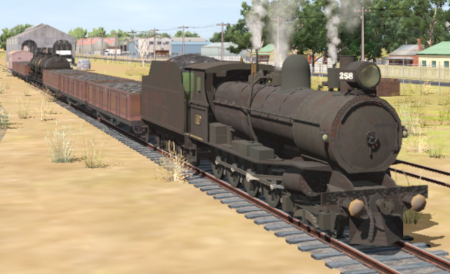
SAR T 258 on Gladstone Goods Loop
See  for a full list of locos. |
| Consist: |
Attached to SAR T 258
|
| The wagons have been placed in the order of their destinations with Peterborough at the front (loco) end and Jamestown at the rear (guard van) end. Each wagon has its destination as part of its name e.g. Tank Peterborough indicating its destination is Peterborough. |
|
|
DLS Session Based on This Scenario
This is a directed session with Navigation Points and Message Popups. Most junction switches will be set for you but you will have to set some switches manually.
<kuid:45176:109304> SAR Northern Division Depot Fuel Run - Train 222 in the timetable below. |
Similar/Related Scenarios |
 |
Each location in the layout has a detailed set of track diagrams that provide a variety of useful information
The Getting Started guide below gives a summary of what is available.
To display this information click any  graphic, or go to the bottom of the page for all the session links (all links will open in this window). |
Getting Started:
- Open the session SAR Northern Division Free Roam Session V2 into Trainz Driver. To do this:
- From the Driver/Surveyor loading screen select the route SAR Northern Division (Narrow Gauge) Route v2
- Then select VIEW SESSIONS
- Then select the session SAR Northern Division Free Roam Session V2
- Click DRIVE SESSION
- If you have already closed the opening message window then pause the session by pressing the P key.
- If you decide to set the session clock to a different starting time (for example: to match the train timetable shown below) then follow the instructions shown in the Orders section
- Next locate your loco. Either:-
- Open the Finder Tool (press Ctrl F ) and type, in the Name field, the name of the loco, in this case SAR T 258 (or just T 258 should be enough). Click the tick icon, OR
- Open the Driver List (bottom left of the screen) and then scroll through the list to find either:-
- the loco name (SAR T 258) OR
- the driver icon (named Driver 258) - this is a non-animated icon
- then click the drivers Eye icon
 to take control of the loco
- Take a few moments to get your bearings. Click
 (this link will open in this window) to show the location details and track plans for Gladstone. In each location details page:-
- Each location details page has direct links to the adjacent locations so you can explore along the route.
- When you are ready to start, reload the Peterborough Base Session page (click the Scenarios button on your current location page) and select this Scenario again or just use the Back button on your browser - whichever is quicker.
- Switch back to Trainz Driver Mode
- Close the opening message window if it is on the screen OR if Pause is shown on the screen instead, press the P key. Both actions will start the session.
|
|
Tutorial:
 |
A tutorial on using these scenarios is provided in the link on the left. The link will open in this window |
|
Orders:
- Proceed to Jamestown and unload the Jamestown CCC (coal) wagons at the Loco Coal & Water Stage. Water the loco if required. Store the empty coal wagons on one of the Loco Depot Siding roads.
- Proceed to Peterborough and unload one of the Peterborough CCC (coal) wagons at the Sub Depot Loco Coal Stage and the remaining CCC wagons at the Main Depot Loco Coal & Water Stage. Store the empty coal wagons on one of the Loco Depot Siding roads and the guard van in the Car Shed .
- Unload the Tank wagons at the Main Depot Loco Fuel & Water Point. Store the empty Tank wagons on one of the Loco Depot Siding roads.
- Coal and water the loco and stable in the Loco Depot Shed yard.
|
 |
| Gladstone-Peterborough Depot Fuel Timetable |
<td > U
<td > U
<td > U
<td > D
<td > D
<td > cwS
<td > cwS
| |
Days
Train № |
|
|
(Sa)
222 |
|
|
M W F
223 |
|
|
(when required) |
|
| Gladstone Yard |
CEFJØWX |
dep |
09:00 |
13:15 |
|
| Caltowie |
FX |
|
09:20 |
13:24 |
|
| Jamestown |
CFØWX |
arr |
09:32 |
13:45 |
|
| Depot |
|
wU |
wU |
Unload designated coal wagons |
| Depot Siding |
|
D |
D |
Detach the designated coal wagons |
|
|
| Jamestown |
dep |
09:55 |
14:05 |
|
| Belalie North |
FX |
arr |
10:07 |
14:201 |
|
| dep |
|
14:30 |
|
| Yongala |
FX |
|
10:19 |
14:42 |
|
| Peterborough Yard |
CEFJØWX |
arr |
10:35 |
14:54 |
|
|
|
| Sub Depot Coal |
|
U |
Unload 1 coal wagon at coal loader |
| Main Depot Fuel/Coal |
|
Unload coal wagons at coal loader, oil tankers at fuel depot |
| Main Depot Sidings |
|
detach and stable wagons in depot sidings |
| Main Loco Depot |
|
Service and stable loco |
|
|
|
| bold time = arrive/depart time |
plain time = timing point |
| Service Symbols: |
| A Attach wagons |
D Detach wagons |
L Load |
S Stable loco |
T Turn loco |
| U Unload |
a on request stop |
c coal (if required) |
w water (if required) |
|
| Location Symbols: |
| Δ = Turning Triangle |
C = Loco Coal Loader |
E = Engine Depot |
F = Fixed Signals |
| J = Junction |
Ø = Loco Turntable |
W = Loco Water Tank |
X = Crossing Loop |
|
|
|
This page was created by Trainz user pware in February 2021 and was last updated as shown below.