How to Use Navigation Point Rules (Applications): Difference between revisions
From TrainzOnline
Jump to navigationJump to search
mNo edit summary |
mNo edit summary |
||
| Line 1: | Line 1: | ||
<table width=1000 bgcolor=#000000 cellpadding=2> | |||
<tr valign="top"> | |||
<td> | |||
<table width=996 bgcolor=#ffffff cellpadding=2> | |||
<tr valign="middle"> | |||
<td width=35>[[image:Information.png|35px|link=]]</td> | |||
<td><span style="font-size: 15px;">The information in this Wiki Page gives examples of how to use the different '''Navigation Point Rules''' in '''Sessions''' created with '''T:ANE''', '''TRS19''', '''TRS22''' and '''Trainz Plus'''.</span></td> | |||
</tr> | |||
</table> | |||
</td> | |||
</tr> | |||
</table> | |||
<br> | |||
<table width=1000> <!-- BEGIN Nav Buttons Table NO SKIPS --> | <table width=1000> <!-- BEGIN Nav Buttons Table NO SKIPS --> | ||
<tr valign="top"> | <tr valign="top"> | ||
| Line 10: | Line 23: | ||
</tr> | </tr> | ||
</table> <!-- END Nav Buttons Table --> | </table> <!-- END Nav Buttons Table --> | ||
<table> | <table> | ||
Latest revision as of 05:56, 4 July 2026
|
 |
 |
|

Application 1: Clearing Unused Navigation Sets |
 |
|
|
 |
The Scenario: |
| A user decides to ignore navigation points at a location and drives straight through. When the consist passes over a trigger the unused navigation point sets are removed |
 |
Preconditions: | |
|
||
 |
Rules Used: | |||||
|
 |
Session Editor Screenshot: |
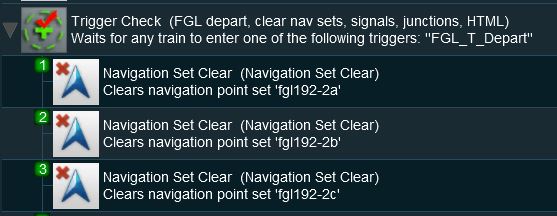 |
 |
Description: |
Line 1 : Trigger Check the event is triggered by the consist leaving the location with the navigation points. This executes the following lines:-
|
Application 2: Checking for Incomplete Sets |
|
 |
|
|
|
The Scenario: |
| A check is made to see if all the navigation points in a navigation set have been completed. If not then the set will be manually completed and a message displayed |
|
Preconditions: | |
|
||
|
Rules Used: | |||||||||
|
|
Session Editor Screenshot: |
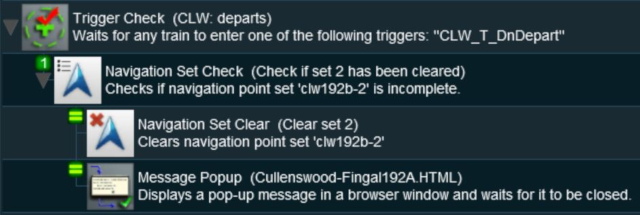 |
|
Description: |
Line 1 : Trigger Check the event is triggered by the consist leaving the location with the navigation points. This executes the following lines:-
|
Application 3: Wait for Loading to be Completed |
|
|
|
|
|
The Scenario: |
| A user controlled train arrives at a Navigation Point positioned at a coal loader. Coal loading proceeds. The Navigation Point remains in place until the last wagon is loaded |
|
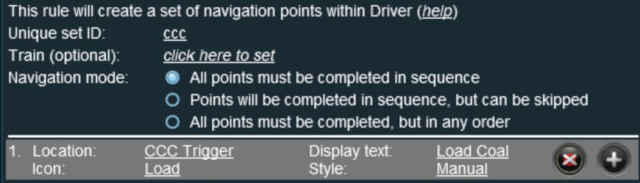
Preconditions: | |||
|
||||
|
Rules Used: |
|
Session Editor Screenshot: |
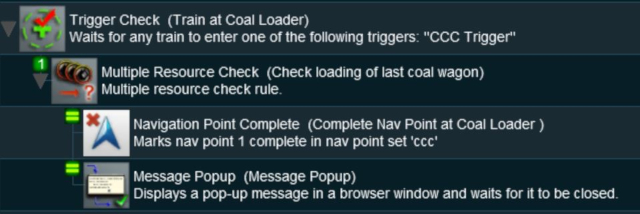 |
|
Description: |
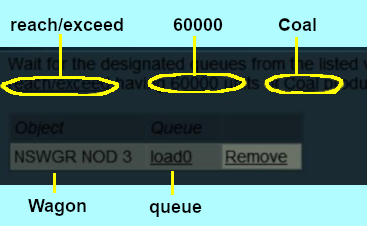
Line 1 : Trigger Check the event is triggered by the arrival of the consist at the coal loader (the Navigation Point). This executes the following lines:-
|
Application 4: User Path Selection |
 |
|
|
|
|
The Scenario: |
| A user controlled train stops at a navigation point in front of a junction and the driver is offered a choice of paths to allow a passing movement by an AI controlled train. Each path is indicated by different sets of navigation points. The path selected will determine other operations such as junction settings and AI train commands |
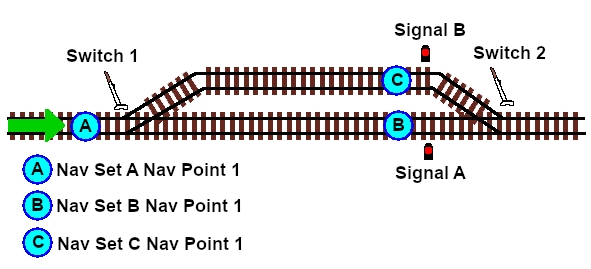 |
|
Preconditions: | |||||||||
|
||||||||||

|
Rules Used: |
| Error creating thumbnail: /bin/bash: line 1: /usr/bin/convert: No such file or directory Error code: 127 | Navigation Display Rule creates the navigation point sets (in Preconditions above) |
| Error creating thumbnail: /bin/bash: line 1: /usr/bin/convert: No such file or directory Error code: 127 | Navigation Set Hide/Show Rule to hide and display the navigation point sets |
| Error creating thumbnail: /bin/bash: line 1: /usr/bin/convert: No such file or directory Error code: 127 | Wait on Navigation Point Rule to trigger the message event |
| Error creating thumbnail: /bin/bash: line 1: /usr/bin/convert: No such file or directory Error code: 127 | Navigation Set Clear Rule to manually terminate a navigation point set |
| Error creating thumbnail: /bin/bash: line 1: /usr/bin/convert: No such file or directory Error code: 127 | Message Popup Rule to open a message window on the screen |
| Error creating thumbnail: /bin/bash: line 1: /usr/bin/convert: No such file or directory Error code: 127 | Set Junctions Rule to set and lock junctions |
| Error creating thumbnail: /bin/bash: line 1: /usr/bin/convert: No such file or directory Error code: 127 | Set Signal Extended Rule to set signals |
| Error creating thumbnail: /bin/bash: line 1: /usr/bin/convert: No such file or directory Error code: 127 | Wait Rule to introduce a short delay |
| Error creating thumbnail: /bin/bash: line 1: /usr/bin/convert: No such file or directory Error code: 127 | Driver Schedule Rule to give commands to the AI controlled train |
|
Session Editor Screenshot: |
Creating the Navigation Point Sets |
|
 |
|

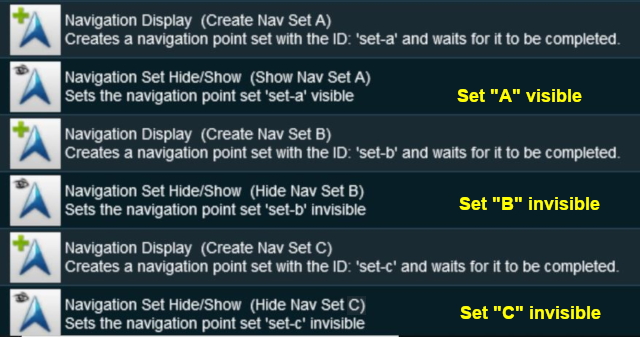 |
| Navigation Point Set A is shown below. Sets B and C are similar. |
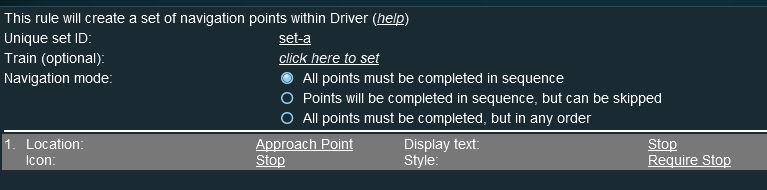 |
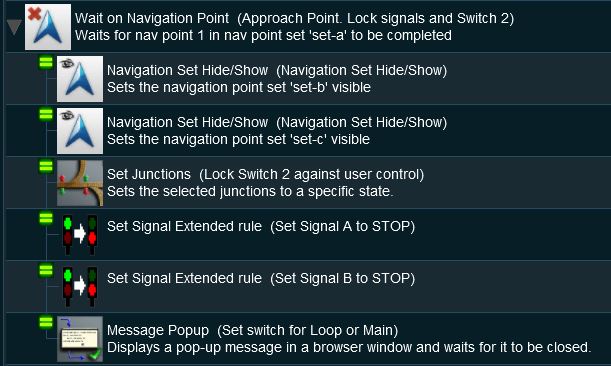
At Navigation Set A Point 1 The Junction |
|
|
 |
|
Description: |
Line 1 : Wait on Navigation Point The event is triggered when the consist reaches (and stops at) Navigation Point 1 in Set A. When triggered, this simultaneously executes the following lines:-
|
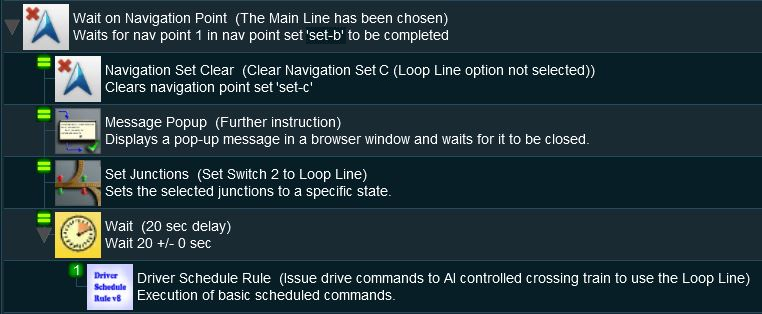
At Navigation Set B Point 1 The Stop signal on the Main Line |
|
|
 |
|
Description: |
Line 1 : Wait on Navigation Point The event is triggered when the consist reaches (and stops at) Navigation Point 1 in Set B. When triggered, this simultaneously executes the following lines:-
|
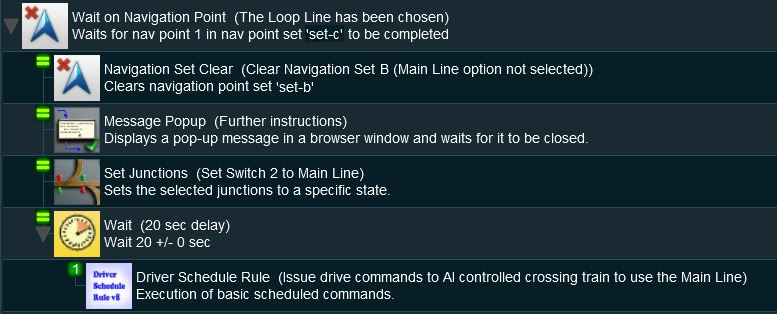
At Navigation Set C Point 1 The Stop Signal on the Loop Line |
|
|
 |
|
Description: |
Line 1 : Wait on Navigation Point The event is triggered when the consist reaches (and stops at) Navigation Point 1 in Set C. When triggered, this simultaneously executes the following lines:-
|
|
|
|
Trainz Wiki
 |
More Tutorials and Guides to Using Trainz |
This page was created by Trainz user pware in May 2018 and was last updated as shown below.


