How to Restore Deleted Assets: Difference between revisions
From TrainzOnline
Jump to navigationJump to search
mNo edit summary |
mNo edit summary |
||
| Line 1: | Line 1: | ||
<!-- Intro Section --> | <!-- Intro Section --> | ||
<table width=1000> | <table width=1000 bgcolor=#000000 cellpadding=2> | ||
<tr valign="top"> | <tr valign="top"> | ||
<td> | <td> | ||
<table width=996 bgcolor=#ffffff cellpadding=2> | |||
<tr valign="middle"> | |||
<td width=35>[[image:Information.png|35px|link=]]</td> | |||
<td><span style="font-size: 15px;">This Wiki Page describes the methods that can be used to restore assets deleted by '''Content Manager''' and the '''Content Store'''. This document applies to '''T:ANE''', '''TRS19''', '''TRS22''' and '''Trainz Plus'''.</span></td> | |||
</tr> | </tr> | ||
</table> | </table> | ||
</td> | |||
</tr> | |||
</table> | |||
<br> | |||
<table width=1000> <!-- BEGIN Nav Buttons Table --> | <table width=1000> <!-- BEGIN Nav Buttons Table --> | ||
<tr valign="top"> | <tr valign="top"> | ||
| Line 727: | Line 734: | ||
<td> | <td> | ||
<span style="font-size: 17px;">'''More Tutorials and Guides to Using Trainz'''</span><br> | <span style="font-size: 17px;">'''More Tutorials and Guides to Using Trainz'''</span><br> | ||
*'''<span class="plain; | *'''<span class="plain;">[http://online.ts2009.com/mediaWiki/index.php/HowTo How to Guides]</span>''' | ||
*'''[[Driver Commands List]]''' | *'''[[Driver Commands List]]''' | ||
*'''[[Session Rule List with Parameters|Session Rules List (Alphabetical) with Parameters]]''' | *'''[[Session Rule List with Parameters|Session Rules List (Alphabetical) with Parameters]]''' | ||
| Line 752: | Line 759: | ||
</table> | </table> | ||
---- | ---- | ||
This page was created by Trainz user '''<span class="plain; | This page was created by Trainz user '''<span class="plain;">[http://online.ts2009.com/mediaWiki/index.php/User:Pware pware]</span>''' in April 2025 and was last updated as shown below. | ||
---- | ---- | ||
[[Category:How-to guides]] | [[Category:How-to guides]] | ||
Revision as of 04:28, 26 July 2026
|
 |
 |
|

Restore DLS Assets |
 |
|
|
 |
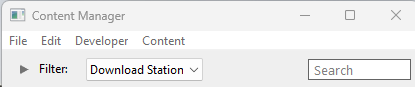
Deleted assets that were originally Installed from DLS can be easily restored by installing them again from the DLS |
|
| Deleted assets that were installed from the DLS are the easiest of all to restore. Simply use Content Manager to locate the assets and download them again. |
|
|||||||||



|


Restore .cdp File Assets |
|
 |
|
|
|
Deleted assets that were installed from .cdp files can be easily restored by reinstalling them from the same .cdp files |
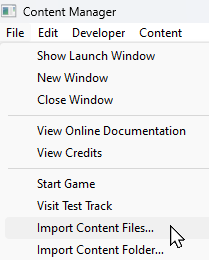 |
Deleted assets that were installed from .cdp files can be reinstalled from the same files.
|
||||||||||||||

Restore Payware and Packaged Assets |
|
|
|
|
|
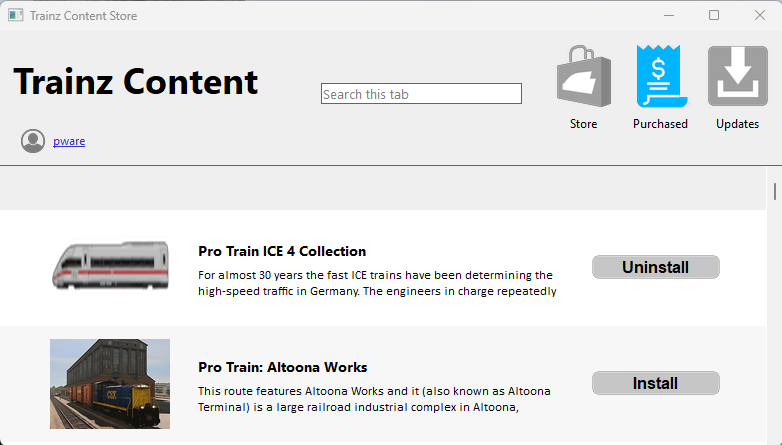
Payware and Packaged assets that were installed from a DLC package can be restored by reinstalling the same DLC Package |
|
If the identical Packaged asset is also on the DLS then it can be restored from there |
|
|
||||||||||||||
Restore Assets from the Automatic Backup |
 |
|
|
|
|
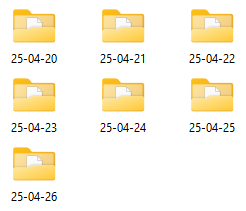
Assets deleted using Content Manager within the last 7 Days are stored in the Backup Folder for the date they were deleted |
|
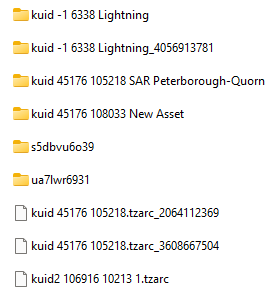
Deleted assets are stored using their <kuid> code(s). Knowing their <kuid> code(s) is very helpful but is not vital |
|
Assets (including routes and sessions) that you have created yourself, or cloned and modified from other assets, are the ones most likely to require this recovery action if you have intentionally or otherwise deleted them. As always the best preventative measure is to perform regular backups of your work using .cdp files. See the Trainz Wiki Page  How to Manage Backups for the details.
How to Manage Backups |
|
Locate the Backups Folder |
|
 |
|
|
|
|
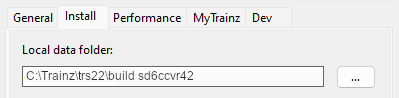
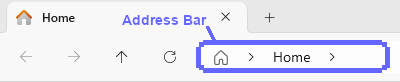
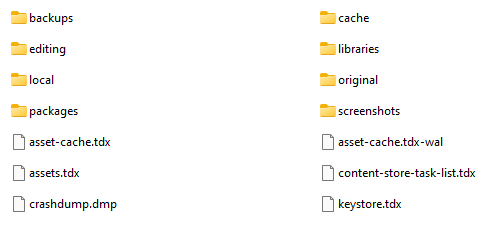
The Backups folder where deleted assets are held is a subfolder of your Local User Data Folder |
|
||||||||||||||||||||||||||||||||||






Locate the Asset Backup Files |
|
|
|
|
|
|
The backups of deleted assets are kept in folders identified by the date (during the last 7 days) when they were deleted |
|
The backups are stored as .tzarc files |
|
||||||||||||||||||||||||||||||
Restore the Asset Backups |
|
|
|
|
|
|
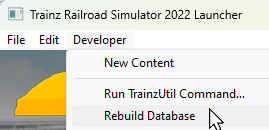
The backup files of the deleted assets have to be copied into the Editing folder and a DBR perfomed |
|
||||||||||||
Check the Restored Assets |
|
|
|
|
|
Use Content Manager to check that the assets have been restored |
|
||||||||||
|
|
Trainz Wiki
|
|


This page was created by Trainz user pware in April 2025 and was last updated as shown below.


