How to Use Parent and Child Rules: Difference between revisions
mNo edit summary |
mNo edit summary |
||
| Line 133: | Line 133: | ||
<table bgcolor=#ffffff cellpadding=2> | <table bgcolor=#ffffff cellpadding=2> | ||
<tr valign="top"> | <tr valign="top"> | ||
<td colspan=2><span style="font-weight: 700; font-size: 15px;">Steps:</span> | <td colspan=2><span style="font-weight: 700; font-size: 15px;">Steps: To Indent a Rule:-</span></td> | ||
</tr> | </tr> | ||
<tr valign="top"> | <tr valign="top"> | ||
| Line 151: | Line 151: | ||
</table> | </table> | ||
==Parent/Child Rule Example== | ==Parent/Child Rule Example== | ||
In the following example, a '''Trigger Check Rule''' is acting as the ''switch'' that decides whether or not its child rules will be executed. If the Trigger is activated, for example by a particular train passing over its track trigger, then its child rules will be executed. Otherwise the '''Trigger Check Rule''' will wait indefinitely until that event occurs, or the session is terminated. | |||
In the following example, a '''Trigger Check Rule''' is acting as the ''switch'' that decides whether or not its child rules will be executed. If the Trigger is activated, for example by a particular train passing over the its track trigger, then its child rules will be executed. Otherwise the '''Trigger Check Rule''' will wait indefinitely until that event occurs, or the session is terminated. | |||
<table width=1000> | <table width=1000> | ||
| Line 352: | Line 353: | ||
<table bgcolor=#ffffff cellpadding=2> | <table bgcolor=#ffffff cellpadding=2> | ||
<tr valign="top"> | <tr valign="top"> | ||
<td colspan=2><span style="font-weight: 700; font-size: 15px;">Steps: | <td colspan=2><span style="font-weight: 700; font-size: 15px;">Steps: To Set the Repeat Options for an Ordered List:-</span></td> | ||
</tr> | </tr> | ||
<tr valign="top"> | <tr valign="top"> | ||
| Line 479: | Line 480: | ||
<table bgcolor=#ffffff cellpadding=2> | <table bgcolor=#ffffff cellpadding=2> | ||
<tr valign="top"> | <tr valign="top"> | ||
<td colspan=2><span style="font-weight: 700; font-size: 15px;">Steps: | <td colspan=2><span style="font-weight: 700; font-size: 15px;">Steps: To Set the Completion Options for a Simultaneous List:-</span></td> | ||
</tr> | </tr> | ||
<tr valign="top"> | <tr valign="top"> | ||
| Line 626: | Line 627: | ||
<table bgcolor=#ffffff cellpadding=2> | <table bgcolor=#ffffff cellpadding=2> | ||
<tr valign="top"> | <tr valign="top"> | ||
<td colspan=2><span style="font-weight: 700; font-size: 15px;">Steps: | <td colspan=2><span style="font-weight: 700; font-size: 15px;">Steps: To Set the Completion Options for a Progressive List:-</span></td> | ||
</tr> | </tr> | ||
<tr valign="top"> | <tr valign="top"> | ||
| Line 679: | Line 680: | ||
</table> | </table> | ||
<br> | <br> | ||
==Random Lists== | ==Random Lists== | ||
Latest revision as of 10:41, 10 September 2026
|
|
 |
 |
 |
What Are Parent and Child Rules?
 |
Rules that act as Parent Rules can have one or more sub-rules or Child Rules under them |
|
Rules are edited and managed by the Session Editor in Surveyor |
 |
More information on the Session Editor can be found on the Trainz Wiki Page at:- |
| Most Parent Rules are used as "decision makers" in Trainz Sessions. They decide if or when other rules, the Child Rules, will be executed. Some Parent Rules control how those Child Rules are executed. |
|
||||||||||

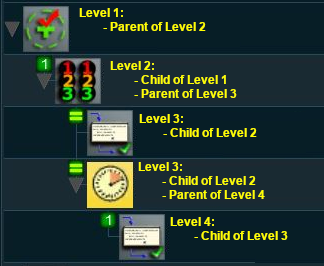 |
Session rules can be arranged in a hierarchical fashion, in a series of levels as shown in the example on the left. A Parent Rule can be used to group together a set of rules at a lower level in the hierarchy. The rules that are grouped together under a Parent Rule are the Child Rules. Child Rules can also be Parent Rules that group together other rules at an even lower level. This creates multiple levels in the hierarchy. The Parent Rule at the head of each level in the hierarchy acts as a switch that directs the Trainz session to either ignore (skip over) or obey (execute) the Child Rules under its control. |
|
Rules that act as Child Rules are indented under a Parent Rule |
| Error creating thumbnail: /bin/bash: line 1: /usr/bin/convert: No such file or directory Error code: 127 |
|
|||||||
Parent/Child Rule Example
In the following example, a Trigger Check Rule is acting as the switch that decides whether or not its child rules will be executed. If the Trigger is activated, for example by a particular train passing over the its track trigger, then its child rules will be executed. Otherwise the Trigger Check Rule will wait indefinitely until that event occurs, or the session is terminated.
| Error creating thumbnail: /bin/bash: line 1: /usr/bin/convert: No such file or directory Error code: 127 |
|
In the screenshot above, the
|
| Sequence of Events | ||||||||
 |
When the consist identified in the Trigger Check Rule, a Parent Rule, reaches the set trigger, the Trigger Event is activated and its Child Rules are executed | |||||||
 |
The Simultaneous List Rule, a Parent Rule, is then executed. It executes all its Child Rules immediately and simultaneously | |||||||
|
||||||||
 |
The Close Message Popup Rule is executed. This closes the Message window created by the Message Popup Rule | |||||||
 |
Since the Close Message Popup Rule is the last child rule under the Wait Rule, when it has completed its task (closing the message popup) it will terminate the Wait Parent Rule | |||||||
 |
Since it is also the last child rule under the Simultaneous List Rule it will terminate that Parent Rule | |||||||
 |
Finally, since it is the last child rule under the Trigger Check Rule, it also terminates that Parent Rule | |||||||

|
 |
|
|
Ordered Lists vs Simultaneous Lists
| The majority of sibling Child Rules, rules that are at the same indent level under a Parent Rule, will be executed in order (an Ordered List) or simultaneously (a Simultaneous List). |
Ordered Lists
|
Details for this rule can be found at  Ordered List Rule |
|
Ordered Lists are shown with numbered icons on each Child Rule which indicates the order in which they will be executed |
| Error creating thumbnail: /bin/bash: line 1: /usr/bin/convert: No such file or directory Error code: 127 |
|
|

Setting the Options
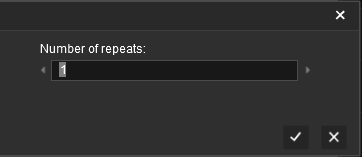
The rule settings allow you to control how many times an Ordered List will run.
|
|
||||||||||||||||||


|
Simultaneous Lists
|
Details for this rule can be found at Simultaneous List Rule |
|
Simultaneous Lists are shown with equality (=) icons on each Child Rule which indicates that they will all be executed at the same time |
| Error creating thumbnail: /bin/bash: line 1: /usr/bin/convert: No such file or directory Error code: 127 |
|
Setting the Options
The rule settings allow you to control how a Simultaneous List will be terminated.
|
|
||||||||||||||||||||



|
|
|
|
|
Other Types of Lists
Progressive Lists
|
Details for this rule can be found at Progressive List Rule |
|
Progressive Lists are shown with numbered icons on each Child Rule which indicates the progressive order in which they will be executed on each cycle of the list |
| Error creating thumbnail: /bin/bash: line 1: /usr/bin/convert: No such file or directory Error code: 127 |
|
Setting the Options
The rule settings allow you to control what happens after the last child rule in a Progressive List has been completed.
|
|
||||||||||||||||||||



Random Lists
|
Details for this rule can be found at Random List Rule |
|
Random Lists are shown with "dot" icons on each Child Rule which indicates that ONE of them will be selected at random |
| Error creating thumbnail: /bin/bash: line 1: /usr/bin/convert: No such file or directory Error code: 127 |
|
Reset Lists
|
Details for this rule can be found at Reset List Rule |
|
Reset Lists are shown with equality (=) icons on each Child Rule which indicates that they will all be executed at the same time |
| Error creating thumbnail: /bin/bash: line 1: /usr/bin/convert: No such file or directory Error code: 127 |
|
|
|
Trainz Wiki
|
|

This page was created by Trainz user pware in May 2018 and was last updated as shown below.


