How to Deal with Missing Assets: Difference between revisions
Created page with "<table width=1000 bgcolor=#000000 cellpadding=2> <tr valign="top"> <td> <table width=996 bgcolor=#ffffff cellpadding=2> <tr valign="middle"> <td width=35>[[image:Information.p..." |
mNo edit summary |
||
| Line 5: | Line 5: | ||
<tr valign="middle"> | <tr valign="middle"> | ||
<td width=35>[[image:Information.png|35px|link=]]</td> | <td width=35>[[image:Information.png|35px|link=]]</td> | ||
<td><span style="font-size: 15px;">The information in this Wiki Page | <td><span style="font-size: 15px;">The information in this Wiki Page gives suggestions on how to deal with missing dependencies (assets) particularly in a route or session. It applies to '''TRS19''', '''TRS22''' and '''Trainz Plus'''.</span></td> | ||
</tr> | </tr> | ||
</table> | </table> | ||
Revision as of 23:39, 16 October 2026
|
 |
 |
|
|||||||
| Downloaded assets can sometimes contain dependencies that are not on the DLS or Built-in (ones that came installed with Trainz). This can lead to frustrations especially if the creator of the downloaded asset has not provided any information on where these missing assets can be found. Even when the location, such as a 3rd party web site, has been identified that site may no longer exist. |
|
||||||||||


| If the missing assets are not on the DLS then fixing this may not be easy. Possible solutions are:- | |
| Error creating thumbnail: /bin/bash: line 1: /usr/bin/convert: No such file or directory Error code: 127 | There is a very long thread in the Trainz Forum where you can find posts looking for the same missing/unknown assets. See  Missing kuids? Post them here |
| Error creating thumbnail: /bin/bash: line 1: /usr/bin/convert: No such file or directory Error code: 127 | You can try contacting the route creator via email (their address may be in the config.txt file) or by a Direct Message through the Trainz Forum |
| Neither is a guaranteed solution. | |
| One option is to delete the missing assets or objects from the route or session but it is recommended that you first check to see that deleting them will not significantly affect the operation of the route or its sessions. |
Locating Missing Dependencies in a Layout
 |
Missing splines and tracks in a layout will be shown as white dotted lines |
|
Missing textures will be, conditionally, shown as a bright blue colour |
|
Missing scenery objects, including rolling stock track objects (e.g. signals, switches) will NOT be visible at all |
Missing Splines (including Track)
| In the following examples... | |
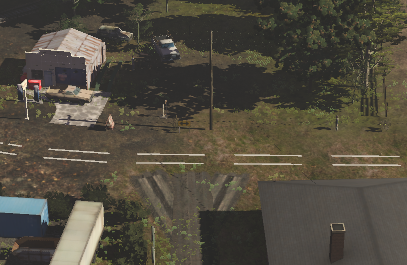 |
The missing spline asset is most likely a road. If deleted it will leave a "space" in the route but it will not affect the operation of sessions that use this route, just their appearence. |
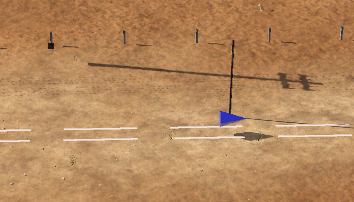 |
The missing spline asset is rail track - the presence of the track objects is a major clue. If deleted it WILL affect the operation of sessions that use this route. |
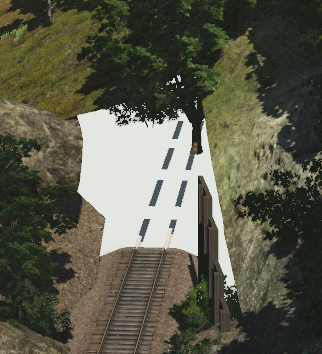 |
The missing spline asset is a tunnel with track. If deleted it will leave a gap in the route and it WILL affect the operation of sessions that use this route. |
Missing Textures
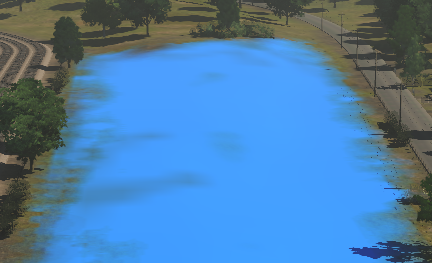 |
The false blue colour indicates that the missing asset is a ground texture. If deleted it will not affect the operation of the route, just its appearence.
|
Missing Scenery Objects (incl Rolling Stock and Track Objects)
|
| Locating these objects in a layout can give you useful clues as to what the missing assets are (e.g. trees/bushes, cars, buildings, signals, wagons, etc). |
|
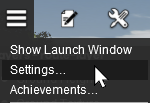
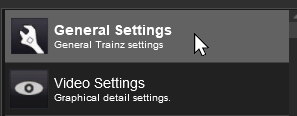
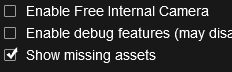


| With the Show missing assets check box set on, each scenery object that is missing from the route or session will be shown as an Orange Wire Frame Box in Surveyor. They will still be invisible in Driver. |
| In the following examples... | |
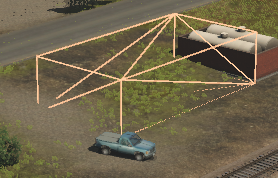 |
From its size and shape, the missing asset is most probably a building. If deleted it will leave a "space" in the route but it will not affect the operation of sessions that use this route, just their appearence. |
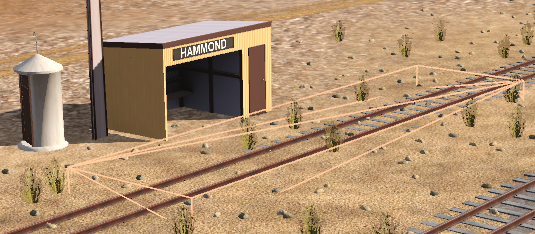 |
The missing asset is almost certainly an Industry Active Platform, possibly an invisible platform. The presence of a visible station building indicates that the missing asset is just the platform. If deleted it WILL affect the operation of sessions that use this route. |
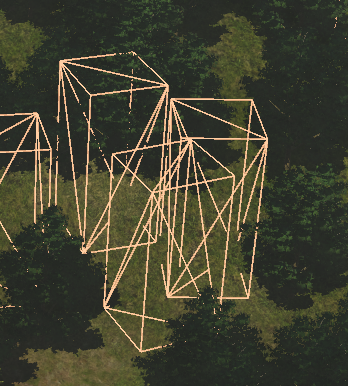 |
From its size, shape and location, the missing asset (or assets - there may be several different missing assets) is most likely a tree. If deleted it will leave gaps in the forest but it will not affect the operation of sessions that use this route, just their appearence. |
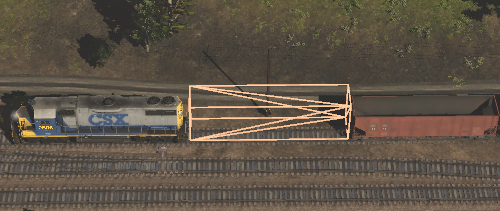 |
The missing asset is clearly rolling stock. If deleted it WILL affect the operation of the session. |
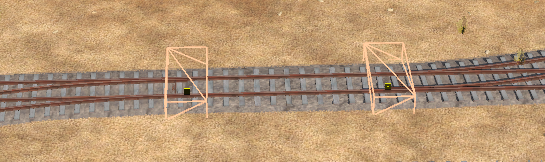 |
Because of its position on the track the missing asset is clearly a track object and almost certainly a track switch. If deleted it COULD affect the operation of the session depending on the type of track object (switch track objects WILL have an effect while caution and whistle signs will probably not). |
Deleting Missing Dependencies
Currently Under Construction
 |
 |
Trainz Wiki
|
|


This page was created by Trainz user pware in October 2026 and was last updated as shown below.


