Understand Content Manager Status Labels: Difference between revisions
mNo edit summary |
|||
| Line 4: | Line 4: | ||
<table width=996 bgcolor=#ffffff cellpadding=2> | <table width=996 bgcolor=#ffffff cellpadding=2> | ||
<tr valign="middle"> | <tr valign="middle"> | ||
<td width=35>[[image: | <td width=35>[[image:Information35.png|link=]]</td> | ||
<td><span style="font-size: 15px;">The information in this Wiki Page describes the different asset '''Status''' labels used by '''Content Manager'''. It applies to '''TRS19''', '''TRS22''' and '''Trainz Plus'''.</span></td> | <td><span style="font-size: 15px;">The information in this Wiki Page describes the different asset '''Status''' labels used by '''Content Manager'''. It applies to '''TRS19''', '''TRS22''' and '''Trainz Plus'''.</span></td> | ||
</tr> | </tr> | ||
| Line 207: | Line 207: | ||
<table> | <table> | ||
<tr valign="top"> | <tr valign="top"> | ||
<td width=10>[[image: | <td width=10>[[image:DotPoint10x10.JPG|link=]]</td> | ||
<td><span style="font-weight: 700; font-size: 16px; color: white; background-color: black;"> Removed </span><br> | <td><span style="font-weight: 700; font-size: 16px; color: white; background-color: black;"> Removed </span><br> | ||
:<span style="font-weight: 700; font-size: 15px; background-color: lightcyan;">Right Click</span> on a column heading and select <span style="font-weight: 700; font-size: 15px; color: white; background-color: black;"> Remove Column </span></td> | :<span style="font-weight: 700; font-size: 15px; background-color: lightcyan;">Right Click</span> on a column heading and select <span style="font-weight: 700; font-size: 15px; color: white; background-color: black;"> Remove Column </span></td> | ||
</tr> | </tr> | ||
<tr valign="top"> | <tr valign="top"> | ||
<td>[[image: | <td>[[image:DotPoint10x10.JPG|link=]]</td> | ||
<td><span style="font-weight: 700; font-size: 16px; color: white; background-color: black;"> Moved </span><br> | <td><span style="font-weight: 700; font-size: 16px; color: white; background-color: black;"> Moved </span><br> | ||
:<span style="font-weight: 700; font-size: 15px; background-color: lightcyan;">Left Click and Drag</span> a column heading left or right</td> | :<span style="font-weight: 700; font-size: 15px; background-color: lightcyan;">Left Click and Drag</span> a column heading left or right</td> | ||
</tr> | </tr> | ||
<tr valign="top"> | <tr valign="top"> | ||
<td>[[image: | <td>[[image:DotPoint10x10.JPG|link=]]</td> | ||
<td><span style="font-weight: 700; font-size: 16px; color: white; background-color: black;"> Resized </span><br> | <td><span style="font-weight: 700; font-size: 16px; color: white; background-color: black;"> Resized </span><br> | ||
:Move the tip of the mouse pointer onto the dividing line between two column headings then <span style="font-weight: 700; font-size: 15px; background-color: lightcyan;">Left Click and Drag</span> it left or right</td> | :Move the tip of the mouse pointer onto the dividing line between two column headings then <span style="font-weight: 700; font-size: 15px; background-color: lightcyan;">Left Click and Drag</span> it left or right</td> | ||
| Line 237: | Line 237: | ||
<table width=996 cellpadding=2> | <table width=996 cellpadding=2> | ||
<tr valign="top"> | <tr valign="top"> | ||
<td width=10>[[image: | <td width=10>[[image:DotPoint10x10.JPG|link=]]</td> | ||
<td>many assets on the Download Station ('''DLS''') are available in more than one version, the '''original''' and at least one '''update'''. When an asset is updated by the release of a new version, the original, and any previously existing updates, will remain on the '''DLS''' for those who prefer to use them instead of the latest release. The status labels '''Newer version available''' and '''Obsolete''' are the result of updates.</td> | <td>many assets on the Download Station ('''DLS''') are available in more than one version, the '''original''' and at least one '''update'''. When an asset is updated by the release of a new version, the original, and any previously existing updates, will remain on the '''DLS''' for those who prefer to use them instead of the latest release. The status labels '''Newer version available''' and '''Obsolete''' are the result of updates.</td> | ||
</tr> | </tr> | ||
<tr valign="top"> | <tr valign="top"> | ||
<td>[[image: | <td>[[image:DotPoint10x10.JPG|link=]]</td> | ||
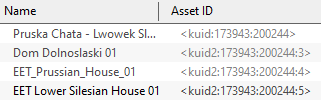
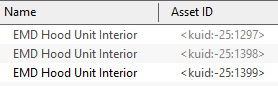
<td>an update will not always have the same name as the original or previous updates. It may also have a completely different '''Asset ID''' (or '''<kuid>''' code number) as shown in the examples below.</td> | <td>an update will not always have the same name as the original or previous updates. It may also have a completely different '''Asset ID''' (or '''<kuid>''' code number) as shown in the examples below.</td> | ||
</tr> | </tr> | ||
| Line 285: | Line 285: | ||
</tr> | </tr> | ||
<tr valign="top"> | <tr valign="top"> | ||
<td>[[image: | <td>[[image:DotPoint10x10.JPG|link=]]</td><td> | ||
<table> | <table> | ||
<tr valign="top"> | <tr valign="top"> | ||
| Line 350: | Line 350: | ||
</tr> | </tr> | ||
<tr valign="top"> | <tr valign="top"> | ||
<td>[[image: | <td>[[image:DotPoint10x10.JPG|link=]]</td> | ||
<td>'''Open for Edit'''</td> | <td>'''Open for Edit'''</td> | ||
</tr> | </tr> | ||
<tr valign="top"> | <tr valign="top"> | ||
<td>[[image: | <td>[[image:DotPoint10x10.JPG|link=]]</td> | ||
<td><span style="font-weight: 700; color: red">Faulty</span></td> | <td><span style="font-weight: 700; color: red">Faulty</span></td> | ||
</tr> | </tr> | ||
<tr valign="top"> | <tr valign="top"> | ||
<td>[[image: | <td>[[image:DotPoint10x10.JPG|link=]]</td> | ||
<td><span style="font-weight: 700; color: red">Missing dependencies</span></td> | <td><span style="font-weight: 700; color: red">Missing dependencies</span></td> | ||
</tr> | </tr> | ||
| Line 398: | Line 398: | ||
<table width=1000> | <table width=1000> | ||
<tr valign="top"> | <tr valign="top"> | ||
<td width=10>[[image: | <td width=10>[[image:DotPoint10x10.JPG|link=]]</td> | ||
<td>You can download and install the newest (latest) version by a <span style="font-weight: 700; font-size: 15px; background-color: lightcyan;"> Right Click </span> on the asset and select the option <span style="font-weight: 700; font-size: 15px; color: white; background-color: black;"> Download </span> from the popup menu. Any versions of the asset, including the one selected, that are are not the newest version will be ignored and '''Content Manager''' will locate and download only the newest version. If the latest version was installed it will be relabelled as '''Installed from DLS''' with no further qualifier. If an earlier version was installed it will be relabelled as '''Installed from DLS, Newer version available'''</td> | <td>You can download and install the newest (latest) version by a <span style="font-weight: 700; font-size: 15px; background-color: lightcyan;"> Right Click </span> on the asset and select the option <span style="font-weight: 700; font-size: 15px; color: white; background-color: black;"> Download </span> from the popup menu. Any versions of the asset, including the one selected, that are are not the newest version will be ignored and '''Content Manager''' will locate and download only the newest version. If the latest version was installed it will be relabelled as '''Installed from DLS''' with no further qualifier. If an earlier version was installed it will be relabelled as '''Installed from DLS, Newer version available'''</td> | ||
</tr> | </tr> | ||
<tr valign="top"> | <tr valign="top"> | ||
<td>[[image: | <td>[[image:DotPoint10x10.JPG|link=]]</td> | ||
<td>You can ignore the newest version to download and install the selected version by a <span style="font-weight: 700; font-size: 15px; background-color: lightcyan;"> Right Click </span> on the asset and select the option <span style="font-weight: 700; font-size: 15px; color: white; background-color: black;"> Download this version </span> from the popup menu. Any newer version of the asset that exists on the '''DLS''' will be ignored and '''Content Manager''' will only download and installed the selected version. The installed asset will be relabelled as '''Installed from DLS, Newer version available'''</td> | <td>You can ignore the newest version to download and install the selected version by a <span style="font-weight: 700; font-size: 15px; background-color: lightcyan;"> Right Click </span> on the asset and select the option <span style="font-weight: 700; font-size: 15px; color: white; background-color: black;"> Download this version </span> from the popup menu. Any newer version of the asset that exists on the '''DLS''' will be ignored and '''Content Manager''' will only download and installed the selected version. The installed asset will be relabelled as '''Installed from DLS, Newer version available'''</td> | ||
</tr> | </tr> | ||
| Line 417: | Line 417: | ||
<table> | <table> | ||
<tr valign="top"> | <tr valign="top"> | ||
<td width=10>[[image: | <td width=10>[[image:DotPoint10x10.JPG|link=]]</td> | ||
<td>The qualifier label '''Newer version available''' can sometimes lead to a "dead end". In the following example several assets have the qualifier '''Newer version available''' on their status but one leads "nowhere". | <td>The qualifier label '''Newer version available''' can sometimes lead to a "dead end". In the following example several assets have the qualifier '''Newer version available''' on their status but one leads "nowhere". | ||
<table> | <table> | ||
| Line 440: | Line 440: | ||
<table> | <table> | ||
<tr valign="top"> | <tr valign="top"> | ||
<td width=10>[[image: | <td width=10>[[image:DotPoint10x10.JPG|link=]]</td> | ||
<td>'''Packaged''' assets with the qualifier label '''Newer version available''' can usually be updated by firstly listing all their asset versions. | <td>'''Packaged''' assets with the qualifier label '''Newer version available''' can usually be updated by firstly listing all their asset versions. | ||
<table width=1000> | <table width=1000> | ||
| Line 460: | Line 460: | ||
<table> | <table> | ||
<tr valign="top"> | <tr valign="top"> | ||
<td width=10>[[image: | <td width=10>[[image:DotPoint10x10.JPG|link=]]</td> | ||
<td>'''Payware''' assets with the qualifier label '''Newer version available''' can sometimes be updated through '''Content Manager''' by listing all their asset versions as shown above <span style="font-weight: 700; font-size: 15px;">IF</span> the asset update has been released as '''Freeware''' through the '''DLS'''. However, if no update is available through '''Content Manager''' then open the '''Content Store''' from the '''Trainz Launcher''' and check for updates.<br> | <td>'''Payware''' assets with the qualifier label '''Newer version available''' can sometimes be updated through '''Content Manager''' by listing all their asset versions as shown above <span style="font-weight: 700; font-size: 15px;">IF</span> the asset update has been released as '''Freeware''' through the '''DLS'''. However, if no update is available through '''Content Manager''' then open the '''Content Store''' from the '''Trainz Launcher''' and check for updates.<br> | ||
[[image:StatusPaywareNewVersion.png|link=]]</td> | [[image:StatusPaywareNewVersion.png|link=]]</td> | ||
| Line 501: | Line 501: | ||
<table width=1000> | <table width=1000> | ||
<tr valign="top"> | <tr valign="top"> | ||
<td width=10>[[image: | <td width=10>[[image:DotPoint10x10.JPG|link=]]</td> | ||
<td>If the selected obsolete asset is also showing the label '''Available for download''' then this specific obsolete version is not installed on your system but it is possible for you to download and install it if you need it - use the <span style="font-weight: 700; font-size: 15px; color: white; background-color: black;"> Download this version </span> option described in the '''Newer Version Available''' section above - after it has been installed it will be relabelled as '''Installed from DLS, Obsolete'''. The latest updated version that is already installed on your system will not be affected by this change</td> | <td>If the selected obsolete asset is also showing the label '''Available for download''' then this specific obsolete version is not installed on your system but it is possible for you to download and install it if you need it - use the <span style="font-weight: 700; font-size: 15px; color: white; background-color: black;"> Download this version </span> option described in the '''Newer Version Available''' section above - after it has been installed it will be relabelled as '''Installed from DLS, Obsolete'''. The latest updated version that is already installed on your system will not be affected by this change</td> | ||
</tr> | </tr> | ||
<tr valign="top"> | <tr valign="top"> | ||
<td>[[image: | <td>[[image:DotPoint10x10.JPG|link=]]</td> | ||
<td>Obsolete '''Installed from DLS''' and '''Modified''' assets can be deleted</td> | <td>Obsolete '''Installed from DLS''' and '''Modified''' assets can be deleted</td> | ||
</tr> | </tr> | ||
<tr valign="top"> | <tr valign="top"> | ||
<td>[[image: | <td>[[image:DotPoint10x10.JPG|link=]]</td> | ||
<td>Obsolete '''Packaged''' and '''Payware''' assets cannot be deleted using '''Content Manager'''. You must use the '''Content Store''' instead but this will delete the entire '''DLC''' package that contains these assets - see '''[[image:PageLink.PNG|link=]] [[#skipDeletingPackaged|Deleting Packaged and Payware Assets]]''' below</td> | <td>Obsolete '''Packaged''' and '''Payware''' assets cannot be deleted using '''Content Manager'''. You must use the '''Content Store''' instead but this will delete the entire '''DLC''' package that contains these assets - see '''[[image:PageLink.PNG|link=]] [[#skipDeletingPackaged|Deleting Packaged and Payware Assets]]''' below</td> | ||
</tr> | </tr> | ||
<tr valign="top"> | <tr valign="top"> | ||
<td>[[image: | <td>[[image:DotPoint10x10.JPG|link=]]</td> | ||
<td>Obsolete '''Built-in''' and '''Base''' assets cannot be deleted</td> | <td>Obsolete '''Built-in''' and '''Base''' assets cannot be deleted</td> | ||
</tr> | </tr> | ||
| Line 559: | Line 559: | ||
<table bgcolor=#c1e7e7> | <table bgcolor=#c1e7e7> | ||
<tr valign="top"> | <tr valign="top"> | ||
<td width=10>[[image: | <td width=10>[[image:DotPoint10x10.JPG|link=]]</td> | ||
<td>The '''Status label <span style="color: white; background-color: black;"> Newer version available </span>''' means that a later version of that asset is also available and can be downloaded and installed</td> | <td>The '''Status label <span style="color: white; background-color: black;"> Newer version available </span>''' means that a later version of that asset is also available and can be downloaded and installed</td> | ||
</tr> | </tr> | ||
<tr valign="top"> | <tr valign="top"> | ||
<td width=10>[[image: | <td width=10>[[image:DotPoint10x10.JPG|link=]]</td> | ||
<td>The '''Status label <span style="color: white; background-color: black;"> Obsolete </span>''' means that a later version of that asset is already installed in '''Content Manager'''</td> | <td>The '''Status label <span style="color: white; background-color: black;"> Obsolete </span>''' means that a later version of that asset is already installed in '''Content Manager'''</td> | ||
</tr> | </tr> | ||
<tr valign="top"> | <tr valign="top"> | ||
<td width=10>[[image: | <td width=10>[[image:DotPoint10x10.JPG|link=]]</td> | ||
<td>You can select and download any asset that is labelled <span style="font-weight: 700; color: white; background-color: black;"> Available for download </span> even if it is also labelled as '''Obsolete''' or '''Newer version available'''</td> | <td>You can select and download any asset that is labelled <span style="font-weight: 700; color: white; background-color: black;"> Available for download </span> even if it is also labelled as '''Obsolete''' or '''Newer version available'''</td> | ||
</tr> | </tr> | ||
| Line 620: | Line 620: | ||
<table> | <table> | ||
<tr valign="top"> | <tr valign="top"> | ||
<td width=10>[[image: | <td width=10>[[image:DotPoint10x10.JPG|link=]]</td> | ||
<td>'''first click''' - sort ascending '''A to Z''', '''1 to 9''', '''Jan to Dec'''</td> | <td>'''first click''' - sort ascending '''A to Z''', '''1 to 9''', '''Jan to Dec'''</td> | ||
</tr> | </tr> | ||
<tr valign="top"> | <tr valign="top"> | ||
<td>[[image: | <td>[[image:DotPoint10x10.JPG|link=]]</td> | ||
<td>'''second click''' - sort descending '''Z to A''', '''9 to 1''', '''Dec to Jan'''</td> | <td>'''second click''' - sort descending '''Z to A''', '''9 to 1''', '''Dec to Jan'''</td> | ||
</tr> | </tr> | ||
<tr valign="top"> | <tr valign="top"> | ||
<td>[[image: | <td>[[image:DotPoint10x10.JPG|link=]]</td> | ||
<td>'''third click''' - repeats first click, etc</td> | <td>'''third click''' - repeats first click, etc</td> | ||
</tr> | </tr> | ||
| Line 943: | Line 943: | ||
<table bgcolor=#c1e7e7> | <table bgcolor=#c1e7e7> | ||
<tr valign="top"> | <tr valign="top"> | ||
<td width=10>[[image: | <td width=10>[[image:DotPoint10x10.JPG|link=]]</td> | ||
<td>The '''Status label <span style="color: white; background-color: black;"> Newer version available </span>''' added to a label means that a later version of that asset is also available and can be downloaded and installed</td> | <td>The '''Status label <span style="color: white; background-color: black;"> Newer version available </span>''' added to a label means that a later version of that asset is also available and can be downloaded and installed</td> | ||
</tr> | </tr> | ||
<tr valign="top"> | <tr valign="top"> | ||
<td width=10>[[image: | <td width=10>[[image:DotPoint10x10.JPG|link=]]</td> | ||
<td>The '''Status label <span style="color: white; background-color: black;"> Obsolete </span>''' added to a label means that a later version of that asset is already installed in '''Content Manager'''</td> | <td>The '''Status label <span style="color: white; background-color: black;"> Obsolete </span>''' added to a label means that a later version of that asset is already installed in '''Content Manager'''</td> | ||
</tr> | </tr> | ||
<tr valign="top"> | <tr valign="top"> | ||
<td width=10>[[image: | <td width=10>[[image:DotPoint10x10.JPG|link=]]</td> | ||
<td>An asset that was originally '''Base''', '''Built-in''', '''Packaged''', '''Payware''' or '''Third Party''' can be updated to '''Installed from DLS''' if a newer version becomes available on the '''DLS'''</td> | <td>An asset that was originally '''Base''', '''Built-in''', '''Packaged''', '''Payware''' or '''Third Party''' can be updated to '''Installed from DLS''' if a newer version becomes available on the '''DLS'''</td> | ||
</tr> | </tr> | ||
<tr valign="top"> | <tr valign="top"> | ||
<td width=10>[[image: | <td width=10>[[image:DotPoint10x10.JPG|link=]]</td> | ||
<td>'''Packaged''' and '''Payware''' assets can '''ONLY''' be deleted ('''Uninstalled''') using the '''Content Store''' and are usually updated through the '''Content Store'''</td> | <td>'''Packaged''' and '''Payware''' assets can '''ONLY''' be deleted ('''Uninstalled''') using the '''Content Store''' and are usually updated through the '''Content Store'''</td> | ||
</tr> | </tr> | ||
| Line 1,007: | Line 1,007: | ||
<table> | <table> | ||
<tr valign="top"> | <tr valign="top"> | ||
<td>[[image: | <td>[[image:DotPoint10x10.JPG|link=]]</td> | ||
<td>Assets labelled as '''Modified, Payware''' are an exception as these are '''DLC''' assets you have modified and they can be deleted using '''Content Manager'''.</td> | <td>Assets labelled as '''Modified, Payware''' are an exception as these are '''DLC''' assets you have modified and they can be deleted using '''Content Manager'''.</td> | ||
</tr> | </tr> | ||
<tr valign="top"> | <tr valign="top"> | ||
<td>[[image: | <td>[[image:DotPoint10x10.JPG|link=]]</td> | ||
<td>But before you uninstall any assets see the<br> | <td>But before you uninstall any assets see the<br> | ||
<span style="font-weight: 700;"><span style="color: white; background-color: red;"> Warning </span> [[image:PageLink.PNG|link=]] [[#DLCWarning|Uninstalling DLC]]</span> below.</td> | <span style="font-weight: 700;"><span style="color: white; background-color: red;"> Warning </span> [[image:PageLink.PNG|link=]] [[#DLCWarning|Uninstalling DLC]]</span> below.</td> | ||
| Line 1,164: | Line 1,164: | ||
<table> | <table> | ||
<tr valign="top"> | <tr valign="top"> | ||
<td>[[image: | <td>[[image:DotPoint10x10.JPG|link=]]</td> | ||
<td>created yourself (it will have your '''kuid''' code)</td> | <td>created yourself (it will have your '''kuid''' code)</td> | ||
</tr> | </tr> | ||
<tr valign="top"> | <tr valign="top"> | ||
<td>[[image: | <td>[[image:DotPoint10x10.JPG|link=]]</td> | ||
<td>modified from an installed asset</td> | <td>modified from an installed asset</td> | ||
</tr> | </tr> | ||
<tr valign="top"> | <tr valign="top"> | ||
<td>[[image: | <td>[[image:DotPoint10x10.JPG|link=]]</td> | ||
<td>cloned from an installed asset (it will have your '''kuid''' code)</td> | <td>cloned from an installed asset (it will have your '''kuid''' code)</td> | ||
</tr> | </tr> | ||
<tr valign="top"> | <tr valign="top"> | ||
<td>[[image: | <td>[[image:DotPoint10x10.JPG|link=]]</td> | ||
<td>imported directly into '''Content Manager''' without using the '''Download''' option - as a result '''Content Manager''' will not know the source of the asset</td> | <td>imported directly into '''Content Manager''' without using the '''Download''' option - as a result '''Content Manager''' will not know the source of the asset</td> | ||
</tr> | </tr> | ||
| Line 1,230: | Line 1,230: | ||
<table> | <table> | ||
<tr valign="top"> | <tr valign="top"> | ||
<td width=10>[[image: | <td width=10>[[image:DotPoint10x10.JPG|link=]]</td> | ||
<td>currently open as a Route or Session in '''Surveyor''' or '''Driver'''. In this case, exiting '''Surveyor''' or '''Driver''' will close the open Route and Session assets</td> | <td>currently open as a Route or Session in '''Surveyor''' or '''Driver'''. In this case, exiting '''Surveyor''' or '''Driver''' will close the open Route and Session assets</td> | ||
</tr> | </tr> | ||
<tr valign="top"> | <tr valign="top"> | ||
<td>[[image: | <td>[[image:DotPoint10x10.JPG|link=]]</td> | ||
<td>opened in '''Content Manager''' for editing - for example changing its '''config.txt''' file or image files</td> | <td>opened in '''Content Manager''' for editing - for example changing its '''config.txt''' file or image files</td> | ||
</tr> | </tr> | ||
<tr valign="top"> | <tr valign="top"> | ||
<td>[[image: | <td>[[image:DotPoint10x10.JPG|link=]]</td> | ||
<td>imported into '''Content Manager''' from a '''Content File''' ('''.cdp''' file) or a '''Content Folder''' when the same asset is already installed. In this case you will need to manually close the open assets</td> | <td>imported into '''Content Manager''' from a '''Content File''' ('''.cdp''' file) or a '''Content Folder''' when the same asset is already installed. In this case you will need to manually close the open assets</td> | ||
</tr> | </tr> | ||
| Line 1,268: | Line 1,268: | ||
<table> | <table> | ||
<tr valign="top"> | <tr valign="top"> | ||
<td width=10>[[image: | <td width=10>[[image:DotPoint10x10.JPG|link=]]</td> | ||
<td>select the option <span style="font-weight: 700; font-size: 15px; color: white; background-color: black;"> Submit Edits </span> to close them with the edits saved, <span style="font-weight: 700; font-size: 15px;">OR</span></td> | <td>select the option <span style="font-weight: 700; font-size: 15px; color: white; background-color: black;"> Submit Edits </span> to close them with the edits saved, <span style="font-weight: 700; font-size: 15px;">OR</span></td> | ||
</tr> | </tr> | ||
<tr valign="top"> | <tr valign="top"> | ||
<td>[[image: | <td>[[image:DotPoint10x10.JPG|link=]]</td> | ||
<td>select the option <span style="font-weight: 700; font-size: 15px; color: white; background-color: black;"> Revert to Original </span> to cancel the edits and return the assets to their previous unedited states, <span style="font-weight: 700; font-size: 15px;">OR</span></td> | <td>select the option <span style="font-weight: 700; font-size: 15px; color: white; background-color: black;"> Revert to Original </span> to cancel the edits and return the assets to their previous unedited states, <span style="font-weight: 700; font-size: 15px;">OR</span></td> | ||
</tr> | </tr> | ||
<tr valign="top"> | <tr valign="top"> | ||
<td>[[image: | <td>[[image:DotPoint10x10.JPG|link=]]</td> | ||
<td>select the option <span style="font-weight: 700; font-size: 15px; color: white; background-color: black;"> Revert if Unchanged </span> if you have opened the assets (in '''Explorer''' or have just viewed their '''config,txt''' files) but have made no changes. Any opened assets that you have changed will remain '''Open for Edit'''</td> | <td>select the option <span style="font-weight: 700; font-size: 15px; color: white; background-color: black;"> Revert if Unchanged </span> if you have opened the assets (in '''Explorer''' or have just viewed their '''config,txt''' files) but have made no changes. Any opened assets that you have changed will remain '''Open for Edit'''</td> | ||
</tr> | </tr> | ||
| Line 1,301: | Line 1,301: | ||
<table> | <table> | ||
<tr valign="top"> | <tr valign="top"> | ||
<td width=10>[[image: | <td width=10>[[image:DotPoint10x10.JPG|link=]]</td> | ||
<td>Assets that are '''Open for edit''' cannot be exported to a '''.cdp''' file or uploaded to the '''DLS'''. They must be closed first</td> | <td>Assets that are '''Open for edit''' cannot be exported to a '''.cdp''' file or uploaded to the '''DLS'''. They must be closed first</td> | ||
</tr> | </tr> | ||
<tr valign="top"> | <tr valign="top"> | ||
<td width=10>[[image: | <td width=10>[[image:DotPoint10x10.JPG|link=]]</td> | ||
<td>If you import assets into '''Trainz''' from a '''Content File (.cdp)''' or a '''Content Folder''' then '''Content Manager''' will not search for and install any missing dependencies from the '''DLS'''. You will have to do this manually. See the [[image:PageLink.PNG|link=]] '''[[#Missing Dependencies|Missing Dependencies]]''' section below</td> | <td>If you import assets into '''Trainz''' from a '''Content File (.cdp)''' or a '''Content Folder''' then '''Content Manager''' will not search for and install any missing dependencies from the '''DLS'''. You will have to do this manually. See the [[image:PageLink.PNG|link=]] '''[[#Missing Dependencies|Missing Dependencies]]''' section below</td> | ||
</tr> | </tr> | ||
<tr valign="top"> | <tr valign="top"> | ||
<td width=10>[[image: | <td width=10>[[image:DotPoint10x10.JPG|link=]]</td> | ||
<td>If '''Trainz''' unexpectedly closes while using '''Surveyor''' or '''Driver''', such as a '''C'''rash '''T'''o '''D'''esktop or it is terminated by '''Windows Task Manager''', then the loaded Route and Session will be '''Open for edit''' when you restart '''Trainz'''.<br> | <td>If '''Trainz''' unexpectedly closes while using '''Surveyor''' or '''Driver''', such as a '''C'''rash '''T'''o '''D'''esktop or it is terminated by '''Windows Task Manager''', then the loaded Route and Session will be '''Open for edit''' when you restart '''Trainz'''.<br> | ||
| Line 1,361: | Line 1,361: | ||
<table width=1000> | <table width=1000> | ||
<tr valign="top"> | <tr valign="top"> | ||
<td width=10>[[image: | <td width=10>[[image:DotPoint10x10.JPG|link=]]</td> | ||
<td>'''Packaged''' by itself means that the asset can be cloned and modified for your personal use. Many, but not all, '''Packaged''' assets will also be found on the '''DLS'''</td> | <td>'''Packaged''' by itself means that the asset can be cloned and modified for your personal use. Many, but not all, '''Packaged''' assets will also be found on the '''DLS'''</td> | ||
</tr> | </tr> | ||
<tr valign="top"> | <tr valign="top"> | ||
<td>[[image: | <td>[[image:DotPoint10x10.JPG|link=]]</td> | ||
<td>'''Payware''' means that the asset is exclusive to a '''DLC''' package and will not be found on the '''DLS'''. Some '''Payware''' assets are encrypted and cannot be cloned or modified</td> | <td>'''Payware''' means that the asset is exclusive to a '''DLC''' package and will not be found on the '''DLS'''. Some '''Payware''' assets are encrypted and cannot be cloned or modified</td> | ||
</tr> | </tr> | ||
| Line 1,431: | Line 1,431: | ||
</tr> | </tr> | ||
<tr valign="top"> | <tr valign="top"> | ||
<td width=10>[[image: | <td width=10>[[image:DotPoint10x10.JPG|link=]]</td> | ||
<td>you have uploaded to the '''DLS''' but they have not yet been approved for distribution. Usually it takes 24 hours (sometimes more) before approval is given. After approval the '''Third Party''' label will be changed to '''Installed from DLS'''</td> | <td>you have uploaded to the '''DLS''' but they have not yet been approved for distribution. Usually it takes 24 hours (sometimes more) before approval is given. After approval the '''Third Party''' label will be changed to '''Installed from DLS'''</td> | ||
</tr> | </tr> | ||
<tr valign="top"> | <tr valign="top"> | ||
<td>[[image: | <td>[[image:DotPoint10x10.JPG|link=]]</td> | ||
<td>have been removed from the '''DLS''' listing, or are not shown in the listing, for a variety of reasons including:- | <td>have been removed from the '''DLS''' listing, or are not shown in the listing, for a variety of reasons including:- | ||
<table> | <table> | ||
| Line 1,560: | Line 1,560: | ||
<table width=1000> | <table width=1000> | ||
<tr valign="top"> | <tr valign="top"> | ||
<td width=10>[[image: | <td width=10>[[image:DotPoint10x10.JPG|link=]]</td> | ||
<td>Disabling assets will "hide" them from other assets, including Routes and Sessions, so they cannot be used. It is a useful technique for deleting troublesome assets from a Route or Session without actually deleting the assets themselves. For an example of this see the Trainz Wiki Page at [[image:WikiLink.PNG|link=]] '''[[How_to_Use_Bulk_Asset_Update/Replace_Tool#Option_3:_Delete_Scenery_Objects|Deleting Stubborn Scenery Assets]]'''.</td> | <td>Disabling assets will "hide" them from other assets, including Routes and Sessions, so they cannot be used. It is a useful technique for deleting troublesome assets from a Route or Session without actually deleting the assets themselves. For an example of this see the Trainz Wiki Page at [[image:WikiLink.PNG|link=]] '''[[How_to_Use_Bulk_Asset_Update/Replace_Tool#Option_3:_Delete_Scenery_Objects|Deleting Stubborn Scenery Assets]]'''.</td> | ||
</tr> | </tr> | ||
<tr valign="top"> | <tr valign="top"> | ||
<td>[[image: | <td>[[image:DotPoint10x10.JPG|link=]]</td> | ||
<td>Normally you would restore ('''Enable''') the '''Disabled''' assets after removing them from the Route or Session.</td> | <td>Normally you would restore ('''Enable''') the '''Disabled''' assets after removing them from the Route or Session.</td> | ||
</tr> | </tr> | ||
<tr valign="top"> | <tr valign="top"> | ||
<td>[[image: | <td>[[image:DotPoint10x10.JPG|link=]]</td> | ||
<td>'''Payware''' assets that are '''Disabled''' will have '''Payware (not active)''' as their status label.</td> | <td>'''Payware''' assets that are '''Disabled''' will have '''Payware (not active)''' as their status label.</td> | ||
</tr> | </tr> | ||
| Line 1,632: | Line 1,632: | ||
</tr> | </tr> | ||
<tr valign="top"> | <tr valign="top"> | ||
<td>[[image: | <td>[[image:DotPoint10x10.JPG|link=]]</td> | ||
<td>a later version of an asset has been uploaded to the '''DLS''' but the original version was not uploaded or had been removed for some reason</td> | <td>a later version of an asset has been uploaded to the '''DLS''' but the original version was not uploaded or had been removed for some reason</td> | ||
</tr> | </tr> | ||
<tr valign="top"> | <tr valign="top"> | ||
<td>[[image: | <td>[[image:DotPoint10x10.JPG|link=]]</td> | ||
<td>the later version of the asset is part of a '''DLC''' package but is not on the '''DLS'''</td> | <td>the later version of the asset is part of a '''DLC''' package but is not on the '''DLS'''</td> | ||
</tr> | </tr> | ||
| Line 1,694: | Line 1,694: | ||
</tr> | </tr> | ||
<tr valign="top"> | <tr valign="top"> | ||
<td>[[image: | <td>[[image:DotPoint10x10.JPG|link=]]</td> | ||
<td>a '''DBR''' (Database Repair) - See the '''Wiki Page [[image:WikiLink.PNG|link=]] [[How_to_Perform_Database_Repairs|How to Perform Database Repairs]]''' for the details</td> | <td>a '''DBR''' (Database Repair) - See the '''Wiki Page [[image:WikiLink.PNG|link=]] [[How_to_Perform_Database_Repairs|How to Perform Database Repairs]]''' for the details</td> | ||
</tr> | </tr> | ||
<tr valign="top"> | <tr valign="top"> | ||
<td>[[image: | <td>[[image:DotPoint10x10.JPG|link=]]</td> | ||
<td>an '''EDBR''' (Extended Database Repair) - See the '''Wiki Page [[image:WikiLink.PNG|link=]] [[How_to_Perform_Database_Repairs|How to Perform Database Repairs]]''' for the details. <span style="font-weight: 700; background-color: yellow;"> Note: An EDBR should be used with caution </span></td> | <td>an '''EDBR''' (Extended Database Repair) - See the '''Wiki Page [[image:WikiLink.PNG|link=]] [[How_to_Perform_Database_Repairs|How to Perform Database Repairs]]''' for the details. <span style="font-weight: 700; background-color: yellow;"> Note: An EDBR should be used with caution </span></td> | ||
</tr> | </tr> | ||
<tr valign="top"> | <tr valign="top"> | ||
<td>[[image: | <td>[[image:DotPoint10x10.JPG|link=]]</td> | ||
<td>reverting the '''Unknown Location''' assets - select all the assets, <span style="font-weight: 700; font-size: 15px; background-color: lightcyan;"> Right Click </span> on one of them and select the option <span style="font-weight: 700; font-size: 15px; color: white; background-color: black;"> Revert to Original </span></td> | <td>reverting the '''Unknown Location''' assets - select all the assets, <span style="font-weight: 700; font-size: 15px; background-color: lightcyan;"> Right Click </span> on one of them and select the option <span style="font-weight: 700; font-size: 15px; color: white; background-color: black;"> Revert to Original </span></td> | ||
</tr> | </tr> | ||
| Line 1,831: | Line 1,831: | ||
<table> | <table> | ||
<tr valign="top"> | <tr valign="top"> | ||
<td width=10>[[image: | <td width=10>[[image:DotPoint10x10.JPG|link=]]</td> | ||
<td>is part of a '''DLC''' item that you have not purchased or it requires a membership option (e.g. '''Plus''' or '''Gold''')</td> | <td>is part of a '''DLC''' item that you have not purchased or it requires a membership option (e.g. '''Plus''' or '''Gold''')</td> | ||
</tr> | </tr> | ||
<tr valign="top"> | <tr valign="top"> | ||
<td>[[image: | <td>[[image:DotPoint10x10.JPG|link=]]</td> | ||
<td>has been updated to a newer version but the source '''DLC''' package has not yet been updated - there may be a delay before the package is updated. This is almost certainly the case if a working payware (or packaged) asset is suddenly relabelled as '''(not active)''' - check the '''Update''' option in the '''Content Store'''</td> | <td>has been updated to a newer version but the source '''DLC''' package has not yet been updated - there may be a delay before the package is updated. This is almost certainly the case if a working payware (or packaged) asset is suddenly relabelled as '''(not active)''' - check the '''Update''' option in the '''Content Store'''</td> | ||
</tr> | </tr> | ||
| Line 1,898: | Line 1,898: | ||
<table> | <table> | ||
<tr valign="top"> | <tr valign="top"> | ||
<td width=10>[[image: | <td width=10>[[image:DotPoint10x10.JPG|link=]]</td> | ||
<td>the first version of the asset ('''<kuid:122285:1161>''') is also the original version and is available on the '''DLS''' but it is now '''Obsolete''' as a later version is already installed</td> | <td>the first version of the asset ('''<kuid:122285:1161>''') is also the original version and is available on the '''DLS''' but it is now '''Obsolete''' as a later version is already installed</td> | ||
</tr> | </tr> | ||
<tr valign="top"> | <tr valign="top"> | ||
<td>[[image: | <td>[[image:DotPoint10x10.JPG|link=]]</td> | ||
<td>the fourth and latest version ('''<kuid2:122285:1161:3>''') is labelled as '''Packaged''' and is installed in '''Content Manager'''. It was installed from a '''DLC''' package and it '''may also''' available on the '''DLS'''</td> | <td>the fourth and latest version ('''<kuid2:122285:1161:3>''') is labelled as '''Packaged''' and is installed in '''Content Manager'''. It was installed from a '''DLC''' package and it '''may also''' available on the '''DLS'''</td> | ||
</tr> | </tr> | ||
| Line 1,978: | Line 1,978: | ||
</tr> | </tr> | ||
<tr valign="top"> | <tr valign="top"> | ||
<td width=10>[[image: | <td width=10>[[image:DotPoint10x10.JPG|link=]]</td> | ||
<td>be from an independent (3rd party) web site</td> | <td>be from an independent (3rd party) web site</td> | ||
</tr> | </tr> | ||
<tr valign="top"> | <tr valign="top"> | ||
<td>[[image: | <td>[[image:DotPoint10x10.JPG|link=]]</td> | ||
<td>have been made by the same creator as the dependant asset but was not uploaded to the '''DLS'''</td> | <td>have been made by the same creator as the dependant asset but was not uploaded to the '''DLS'''</td> | ||
</tr> | </tr> | ||
<tr valign="top"> | <tr valign="top"> | ||
<td>[[image: | <td>[[image:DotPoint10x10.JPG|link=]]</td> | ||
<td>have been removed from the '''DLS''' for some reason (a rare event but it does happen)</td> | <td>have been removed from the '''DLS''' for some reason (a rare event but it does happen)</td> | ||
</tr> | </tr> | ||
<tr valign="top"> | <tr valign="top"> | ||
<td>[[image: | <td>[[image:DotPoint10x10.JPG|link=]]</td> | ||
<td>simply not exist, anywhere</td> | <td>simply not exist, anywhere</td> | ||
</tr> | </tr> | ||
| Line 1,997: | Line 1,997: | ||
</tr> | </tr> | ||
<tr valign="top"> | <tr valign="top"> | ||
<td>[[image: | <td>[[image:DotPoint10x10.JPG|link=]]</td> | ||
<td>There is a very long thread in the '''Trainz Forum''' where you can find posts looking for missing/unknown assets. See [[file:WikiLink.PNG|link=]] '''[https://forums.auran.com/trainz/showthread.php?111942 Missing kuids? Post them here]'''</td> | <td>There is a very long thread in the '''Trainz Forum''' where you can find posts looking for missing/unknown assets. See [[file:WikiLink.PNG|link=]] '''[https://forums.auran.com/trainz/showthread.php?111942 Missing kuids? Post them here]'''</td> | ||
</tr> | </tr> | ||
<tr valign="top"> | <tr valign="top"> | ||
<td>[[image: | <td>[[image:DotPoint10x10.JPG|link=]]</td> | ||
<td>You can try contacting the creator via email (their address may be in the '''config.txt''' file) or by a '''Direct Message''' through the '''Trainz Forum'''</td> | <td>You can try contacting the creator via email (their address may be in the '''config.txt''' file) or by a '''Direct Message''' through the '''Trainz Forum'''</td> | ||
</tr> | </tr> | ||
| Line 2,156: | Line 2,156: | ||
<table> | <table> | ||
<tr valign="top"> | <tr valign="top"> | ||
<td width=10>[[image: | <td width=10>[[image:DotPoint10x10.JPG|link=]]</td> | ||
<td>the packages that have already been installed will be shown with an '''Uninstall''' button</td> | <td>the packages that have already been installed will be shown with an '''Uninstall''' button</td> | ||
</tr> | </tr> | ||
<tr valign="top"> | <tr valign="top"> | ||
<td>[[image: | <td>[[image:DotPoint10x10.JPG|link=]]</td> | ||
<td>the packages that you have purchased, or your membership level allows you to install, but have not yet been installed will be shown with an '''Install''' button</td> | <td>the packages that you have purchased, or your membership level allows you to install, but have not yet been installed will be shown with an '''Install''' button</td> | ||
</tr> | </tr> | ||
| Line 2,286: | Line 2,286: | ||
<table> | <table> | ||
<tr valign="top"> | <tr valign="top"> | ||
<td width=10>[[image: | <td width=10>[[image:DotPoint10x10.JPG|link=]]</td> | ||
<td>the packages that have already been installed will be shown with an '''Uninstall''' button</td> | <td>the packages that have already been installed will be shown with an '''Uninstall''' button</td> | ||
</tr> | </tr> | ||
<tr valign="top"> | <tr valign="top"> | ||
<td>[[image: | <td>[[image:DotPoint10x10.JPG|link=]]</td> | ||
<td>the packages that you have purchased, or are entitled to use, but have not yet been installed will be shown with an '''Install''' button</td> | <td>the packages that you have purchased, or are entitled to use, but have not yet been installed will be shown with an '''Install''' button</td> | ||
</tr> | </tr> | ||
| Line 2,322: | Line 2,322: | ||
<table> | <table> | ||
<tr valign="top"> | <tr valign="top"> | ||
<td width=10>[[image: | <td width=10>[[image:DotPoint10x10.JPG|link=]]</td> | ||
<td>'''If you Uninstall a DLC package then <u>ALL</u> its Packaged assets will be deleted''', even if those same assets were previously labelled as '''Installed from DLS'''</td> | <td>'''If you Uninstall a DLC package then <u>ALL</u> its Packaged assets will be deleted''', even if those same assets were previously labelled as '''Installed from DLS'''</td> | ||
</tr> | </tr> | ||
| Line 2,343: | Line 2,343: | ||
<table> | <table> | ||
<tr valign="top"> | <tr valign="top"> | ||
<td width=10>[[image: | <td width=10>[[image:DotPoint10x10.JPG|link=]]</td> | ||
<td>Be aware that it is possible that some of the '''Packaged''' assets that were uninstalled may '''NOT''' be on the '''DLS''' - that is a decision made by the creator of the '''DLC''' package</td> | <td>Be aware that it is possible that some of the '''Packaged''' assets that were uninstalled may '''NOT''' be on the '''DLS''' - that is a decision made by the creator of the '''DLC''' package</td> | ||
</tr> | </tr> | ||
| Line 2,388: | Line 2,388: | ||
<table bgcolor=#c1e7e7 cellpadding=5> | <table bgcolor=#c1e7e7 cellpadding=5> | ||
<tr valign="top"> | <tr valign="top"> | ||
<td width=10>[[image: | <td width=10>[[image:DotPoint10x10.JPG|link=]]</td> | ||
<td>The '''Status label <span style="color: white; background-color: black;"> Newer version available </span>''' means that a later version of that asset is also available and can be downloaded and installed</td> | <td>The '''Status label <span style="color: white; background-color: black;"> Newer version available </span>''' means that a later version of that asset is also available and can be downloaded and installed</td> | ||
</tr> | </tr> | ||
<tr valign="top"> | <tr valign="top"> | ||
<td width=10>[[image: | <td width=10>[[image:DotPoint10x10.JPG|link=]]</td> | ||
<td>The '''Status label <span style="color: white; background-color: black;"> Obsolete </span>''' means that a later version of that asset is already installed in '''Content Manager'''</td> | <td>The '''Status label <span style="color: white; background-color: black;"> Obsolete </span>''' means that a later version of that asset is already installed in '''Content Manager'''</td> | ||
</tr> | </tr> | ||
<tr valign="top"> | <tr valign="top"> | ||
<td width=10>[[image: | <td width=10>[[image:DotPoint10x10.JPG|link=]]</td> | ||
<td>An asset that was originally '''Packaged''' or '''Payware''' can be changed to '''Installed from DLS''' if an update is installed from the '''DLS'''. It is possible for a '''Payware''' asset to be replaced by an updated "Freeware" version, </td> | <td>An asset that was originally '''Packaged''' or '''Payware''' can be changed to '''Installed from DLS''' if an update is installed from the '''DLS'''. It is possible for a '''Payware''' asset to be replaced by an updated "Freeware" version, </td> | ||
</tr> | </tr> | ||
| Line 2,448: | Line 2,448: | ||
<table> | <table> | ||
<tr valign="top"> | <tr valign="top"> | ||
<td>[[image: | <td>[[image:DotPoint10x10.JPG|link=]]</td> | ||
<td>Assets that are labelled as '''Packaged''' or '''Payware''' can only be deleted using '''Uninstall''' in the '''Content Store''', not from '''Content Manager'''</td> | <td>Assets that are labelled as '''Packaged''' or '''Payware''' can only be deleted using '''Uninstall''' in the '''Content Store''', not from '''Content Manager'''</td> | ||
</tr> | </tr> | ||
<tr valign="top"> | <tr valign="top"> | ||
<td>[[image: | <td>[[image:DotPoint10x10.JPG|link=]]</td> | ||
<td>'''Modified, Payware''' is an exception as these are assets you have modified and can be deleted using '''Content Manager'''.</td> | <td>'''Modified, Payware''' is an exception as these are assets you have modified and can be deleted using '''Content Manager'''.</td> | ||
</tr> | </tr> | ||
| Line 2,549: | Line 2,549: | ||
<table> | <table> | ||
<tr valign="top"> | <tr valign="top"> | ||
<td width=10>[[image: | <td width=10>[[image:DotPoint10x10.JPG|link=]]</td> | ||
<td>In the example shown left the assets are in a saved '''Picklist''' named '''Fences & Walls''' but it could be the '''Installed''' filter sorted on the '''Status''' column to group all the '''Packaged''' assets together or use a '''Custom''' filter with '''Packaged = True'''.</td> | <td>In the example shown left the assets are in a saved '''Picklist''' named '''Fences & Walls''' but it could be the '''Installed''' filter sorted on the '''Status''' column to group all the '''Packaged''' assets together or use a '''Custom''' filter with '''Packaged = True'''.</td> | ||
</tr> | </tr> | ||
| Line 2,570: | Line 2,570: | ||
<table> | <table> | ||
<tr valign="top"> | <tr valign="top"> | ||
<td width=10>[[image: | <td width=10>[[image:DotPoint10x10.JPG|link=]]</td> | ||
<td>This will open a new search window with the selected assets.</td> | <td>This will open a new search window with the selected assets.</td> | ||
</tr> | </tr> | ||
| Line 2,587: | Line 2,587: | ||
<table> | <table> | ||
<tr valign="top"> | <tr valign="top"> | ||
<td width=10>[[image: | <td width=10>[[image:DotPoint10x10.JPG|link=]]</td> | ||
<td>Any assets that remain in the display will be found on the '''DLS'''.</td> | <td>Any assets that remain in the display will be found on the '''DLS'''.</td> | ||
</tr> | </tr> | ||
<tr valign="top"> | <tr valign="top"> | ||
<td>[[image: | <td>[[image:DotPoint10x10.JPG|link=]]</td> | ||
<td>Any assets that vanish are not on the '''DLS'''.</td> | <td>Any assets that vanish are not on the '''DLS'''.</td> | ||
</tr> | </tr> | ||
| Line 2,663: | Line 2,663: | ||
<table bgcolor=#ffffff cellpadding=2> | <table bgcolor=#ffffff cellpadding=2> | ||
<tr valign="top"> | <tr valign="top"> | ||
<td width=10>[[image: | <td width=10>[[image:DotPoint10x10.JPG|link=]]</td> | ||
<td>Assets that are labelled as '''Packaged''', such as '''Panel access Library''' (in the image on the left), and assets labelled as '''Installed from DLS''', such as '''Locomotive sand''', are shown with the label <span style="font-weight: 700; font-size: 15px;">Newer version available</span>. These assets can be updated <span style="font-weight: 700; font-size: 15px;">IF</span> the updates are on the '''DLS'''</td> | <td>Assets that are labelled as '''Packaged''', such as '''Panel access Library''' (in the image on the left), and assets labelled as '''Installed from DLS''', such as '''Locomotive sand''', are shown with the label <span style="font-weight: 700; font-size: 15px;">Newer version available</span>. These assets can be updated <span style="font-weight: 700; font-size: 15px;">IF</span> the updates are on the '''DLS'''</td> | ||
</tr> | </tr> | ||
<tr valign="top"> | <tr valign="top"> | ||
<td>[[image: | <td>[[image:DotPoint10x10.JPG|link=]]</td> | ||
<td>one '''Packaged''' asset in the list, '''Transformer 1''', is listed without the label '''Newer version available''' yet it was returned by the search filter as having an update available</td> | <td>one '''Packaged''' asset in the list, '''Transformer 1''', is listed without the label '''Newer version available''' yet it was returned by the search filter as having an update available</td> | ||
</tr> | </tr> | ||
| Line 2,703: | Line 2,703: | ||
</tr> | </tr> | ||
<tr valign="top"> | <tr valign="top"> | ||
<td width=10>[[image: | <td width=10>[[image:DotPoint10x10.JPG|link=]]</td> | ||
<td>the original installed '''Packaged''' version is now labelled '''Packaged, Obsolete''' and has been replaced by the newer version labelled '''Installed from DLS'''</td> | <td>the original installed '''Packaged''' version is now labelled '''Packaged, Obsolete''' and has been replaced by the newer version labelled '''Installed from DLS'''</td> | ||
</tr> | </tr> | ||
<tr valign="top"> | <tr valign="top"> | ||
<td>[[image: | <td>[[image:DotPoint10x10.JPG|link=]]</td> | ||
<td>note the difference in the file sizes of the two installed versions. This could be due to changes made to the asset but it is also due to the lower compression used on '''DLS''' assets compared to '''Packaged''' assets</td> | <td>note the difference in the file sizes of the two installed versions. This could be due to changes made to the asset but it is also due to the lower compression used on '''DLS''' assets compared to '''Packaged''' assets</td> | ||
</tr> | </tr> | ||
| Line 2,739: | Line 2,739: | ||
<table> | <table> | ||
<tr valign="top"> | <tr valign="top"> | ||
<td width=10>[[image: | <td width=10>[[image:DotPoint10x10.JPG|link=]]</td> | ||
<td>Assets that are labelled as '''Payware, Newer version available''' are normally updated by opening the '''Content Store''' from the '''Trainz Launcher''' and then running the '''Updates''' option. Sometimes an update to a '''Payware''' asset is released as '''Freeware''' on the '''DLS'''. In this case <span style="font-weight: 700; font-size: 15px; background-color: lightcyan;"> Right Click </span> on the asset and select the option <span style="font-weight: 700; font-size: 15px; color: white; background-color: black;"> Download </span> to download and install the update. If nothing is downloaded then the update is not on the '''DLS''' so try the '''Content Store''' | <td>Assets that are labelled as '''Payware, Newer version available''' are normally updated by opening the '''Content Store''' from the '''Trainz Launcher''' and then running the '''Updates''' option. Sometimes an update to a '''Payware''' asset is released as '''Freeware''' on the '''DLS'''. In this case <span style="font-weight: 700; font-size: 15px; background-color: lightcyan;"> Right Click </span> on the asset and select the option <span style="font-weight: 700; font-size: 15px; color: white; background-color: black;"> Download </span> to download and install the update. If nothing is downloaded then the update is not on the '''DLS''' so try the '''Content Store''' | ||
</td> | </td> | ||
</tr> | </tr> | ||
<tr valign="top"> | <tr valign="top"> | ||
<td>[[image: | <td>[[image:DotPoint10x10.JPG|link=]]</td> | ||
<td>Some assets that are labelled as '''Packaged, Newer version available''' such as '''Villa blue''' shown left, but if they are highlighted and the option <span style="font-weight: 700; font-size: 15px; color: white; background-color: black;"> Download </span> is selected then nothing will be downloaded and installed. The update is most likely in a '''DLC''' package | <td>Some assets that are labelled as '''Packaged, Newer version available''' such as '''Villa blue''' shown left, but if they are highlighted and the option <span style="font-weight: 700; font-size: 15px; color: white; background-color: black;"> Download </span> is selected then nothing will be downloaded and installed. The update is most likely in a '''DLC''' package | ||
</td> | </td> | ||
| Line 2,813: | Line 2,813: | ||
</tr> | </tr> | ||
<tr valign="top"> | <tr valign="top"> | ||
<td>[[image: | <td>[[image:DotPoint10x10.JPG|link=]]</td> | ||
<td>Some '''DLC''' assets are encrypted and cannot be cloned or modified</td> | <td>Some '''DLC''' assets are encrypted and cannot be cloned or modified</td> | ||
</tr> | </tr> | ||
<tr valign="top"> | <tr valign="top"> | ||
<td>[[image: | <td>[[image:DotPoint10x10.JPG|link=]]</td> | ||
<td>Your modified route or session will be saved as an '''alias''' of the original and, provided the original remains on your system (i.e. it is not deleted or disabled), then your modified copy will work</td> | <td>Your modified route or session will be saved as an '''alias''' of the original and, provided the original remains on your system (i.e. it is not deleted or disabled), then your modified copy will work</td> | ||
</tr> | </tr> | ||
<tr valign="top"> | <tr valign="top"> | ||
<td>[[image: | <td>[[image:DotPoint10x10.JPG|link=]]</td> | ||
<td>You can upload a modified '''DLC''' route or session to the '''DLS''' (again, if the creator allows this) for others to download and use but they must also have the original unmodified route (and session) installed on their system</td> | <td>You can upload a modified '''DLC''' route or session to the '''DLS''' (again, if the creator allows this) for others to download and use but they must also have the original unmodified route (and session) installed on their system</td> | ||
</tr> | </tr> | ||
<tr valign="top"> | <tr valign="top"> | ||
<td>[[image: | <td>[[image:DotPoint10x10.JPG|link=]]</td> | ||
<td>It is '''NOT possible''' to merge a '''DLC''' route, or a cloned '''DLC''' route, with another route (payware or freeware) as this will remove the payware protection from the route</td> | <td>It is '''NOT possible''' to merge a '''DLC''' route, or a cloned '''DLC''' route, with another route (payware or freeware) as this will remove the payware protection from the route</td> | ||
</tr> | </tr> | ||
| Line 3,003: | Line 3,003: | ||
<table> | <table> | ||
<tr valign="top"> | <tr valign="top"> | ||
<td width=10>[[image: | <td width=10>[[image:DotPoint10x10.JPG|link=]]</td> | ||
<td>The situation described here only applies if the update to the asset occurred '''after''' the route was created and uploaded to the '''DLS'''. The config.txt file of the route will refer to and use the older (and now obsolete) version of the asset, but listing the dependencies of the route will show the new update as a required dependency.</td> | <td>The situation described here only applies if the update to the asset occurred '''after''' the route was created and uploaded to the '''DLS'''. The config.txt file of the route will refer to and use the older (and now obsolete) version of the asset, but listing the dependencies of the route will show the new update as a required dependency.</td> | ||
</tr> | </tr> | ||
<tr valign="top"> | <tr valign="top"> | ||
<td>[[image: | <td>[[image:DotPoint10x10.JPG|link=]]</td> | ||
<td>If the update is used in a new route (created after the update was installed) then the config.txt file of the route will refer to and use the new version of the asset. If the route is installed into a copy of Trainz that does not have the update then the route will be flagged a '''Faulty''' with '''missing dependencies''' | <td>If the update is used in a new route (created after the update was installed) then the config.txt file of the route will refer to and use the new version of the asset. If the route is installed into a copy of Trainz that does not have the update then the route will be flagged a '''Faulty''' with '''missing dependencies''' | ||
</td> | </td> | ||
| Line 3,018: | Line 3,018: | ||
<table> | <table> | ||
<tr valign="top"> | <tr valign="top"> | ||
<td>[[image: | <td>[[image:DotPoint10x10.JPG|link=]]</td> | ||
<td>if an earlier version (''':3''' in this example) has been installed then it will be used instead of the update (''':4''' in this example) and no '''missing dependency''' or '''<unknown asset>''' messages will appear on the new route</td> | <td>if an earlier version (''':3''' in this example) has been installed then it will be used instead of the update (''':4''' in this example) and no '''missing dependency''' or '''<unknown asset>''' messages will appear on the new route</td> | ||
</tr> | </tr> | ||
<tr valign="top"> | <tr valign="top"> | ||
<td>[[image: | <td>[[image:DotPoint10x10.JPG|link=]]</td> | ||
<td>if an earlier version of the asset is '''NOT''' installed, then the latest '''Available for download''' version (''':3''') can be downloaded and installed from the '''DLS'''. This will occur automatically if the route was installed directly from the '''DLS''', or manually if it was imported from another source. After the ''':3''' version has been installed, the '''missing dependency''' and '''<unknown asset>''' messages will not appear on the route. Because the updated ''':4''' version has not been uploaded to the '''DLS''' then the label '''newer version available''' will not appear on the ''':3''' version</td> | <td>if an earlier version of the asset is '''NOT''' installed, then the latest '''Available for download''' version (''':3''') can be downloaded and installed from the '''DLS'''. This will occur automatically if the route was installed directly from the '''DLS''', or manually if it was imported from another source. After the ''':3''' version has been installed, the '''missing dependency''' and '''<unknown asset>''' messages will not appear on the route. Because the updated ''':4''' version has not been uploaded to the '''DLS''' then the label '''newer version available''' will not appear on the ''':3''' version</td> | ||
</tr> | </tr> | ||
<tr valign="top"> | <tr valign="top"> | ||
<td>[[image: | <td>[[image:DotPoint10x10.JPG|link=]]</td> | ||
<td>if there is '''NO Earlier''' version of the ''':4''' asset available from the '''DLS''' then the installed route will be labelled as having a '''missing dependency''' and the asset will be labelled as an '''<unknown asset>'''</td> | <td>if there is '''NO Earlier''' version of the ''':4''' asset available from the '''DLS''' then the installed route will be labelled as having a '''missing dependency''' and the asset will be labelled as an '''<unknown asset>'''</td> | ||
</tr> | </tr> | ||
| Line 3,114: | Line 3,114: | ||
<table> | <table> | ||
<tr valign="top"> | <tr valign="top"> | ||
<td width=10>[[image: | <td width=10>[[image:DotPoint10x10.JPG|link=]]</td> | ||
<td>a tag or its data has not been correctly formatted (spelling and syntax errors were common problems in the early days)</td> | <td>a tag or its data has not been correctly formatted (spelling and syntax errors were common problems in the early days)</td> | ||
</tr> | </tr> | ||
<tr valign="top"> | <tr valign="top"> | ||
<td>[[image: | <td>[[image:DotPoint10x10.JPG|link=]]</td> | ||
<td>data, files or tags are missing when they are required to be present (as shown in the error message above)</td> | <td>data, files or tags are missing when they are required to be present (as shown in the error message above)</td> | ||
</tr> | </tr> | ||
<tr valign="top"> | <tr valign="top"> | ||
<td>[[image: | <td>[[image:DotPoint10x10.JPG|link=]]</td> | ||
<td>tags are in the wrong "container" (another type of tag)</td> | <td>tags are in the wrong "container" (another type of tag)</td> | ||
</tr> | </tr> | ||
| Line 3,145: | Line 3,145: | ||
<table> | <table> | ||
<tr valign="top"> | <tr valign="top"> | ||
<td width=10>[[image: | <td width=10>[[image:DotPoint10x10.JPG|link=]]</td> | ||
<td>Some faulty assets can often be repaired by the following steps:. | <td>Some faulty assets can often be repaired by the following steps:. | ||
<table bgcolor=#ffffff cellpadding=2> | <table bgcolor=#ffffff cellpadding=2> | ||
| Line 3,174: | Line 3,174: | ||
</tr> | </tr> | ||
<tr valign="top"> | <tr valign="top"> | ||
<td>[[image: | <td>[[image:DotPoint10x10.JPG|link=]]</td> | ||
<td>Performing a '''DBR''' (DataBase Repair) can sometimes fix other faulty assets. See the '''Wiki Page [[image:WikiLink.PNG|link=]] [[How_to_Perform_Database_Repairs|How to Perform Database Repairs]]''' for the details</td> | <td>Performing a '''DBR''' (DataBase Repair) can sometimes fix other faulty assets. See the '''Wiki Page [[image:WikiLink.PNG|link=]] [[How_to_Perform_Database_Repairs|How to Perform Database Repairs]]''' for the details</td> | ||
</tr> | </tr> | ||
<tr valign="top"> | <tr valign="top"> | ||
<td>[[image: | <td>[[image:DotPoint10x10.JPG|link=]]</td> | ||
<td>Unfortunately there are many faults that can only be repaired by the person who created the asset</td> | <td>Unfortunately there are many faults that can only be repaired by the person who created the asset</td> | ||
</tr> | </tr> | ||
| Line 3,210: | Line 3,210: | ||
<table> | <table> | ||
<tr valign="top"> | <tr valign="top"> | ||
<td width=10>[[image: | <td width=10>[[image:DotPoint10x10.JPG|link=]]</td> | ||
<td>'''Warnings''' can be ignored but a warning in your current version of '''Trainz''' may become an error in a future version</td> | <td>'''Warnings''' can be ignored but a warning in your current version of '''Trainz''' may become an error in a future version</td> | ||
</tr> | </tr> | ||
<tr valign="top"> | <tr valign="top"> | ||
<td>[[image: | <td>[[image:DotPoint10x10.JPG|link=]]</td> | ||
<td>'''Errors''' will usually cause problems for the asset or any other assets, including routes and sessions, that use the faulty asset</td> | <td>'''Errors''' will usually cause problems for the asset or any other assets, including routes and sessions, that use the faulty asset</td> | ||
</tr> | </tr> | ||
| Line 3,327: | Line 3,327: | ||
<table width=1000> | <table width=1000> | ||
<tr valign="top"> | <tr valign="top"> | ||
<td width=10>[[image: | <td width=10>[[image:DotPoint10x10.JPG|link=]]</td> | ||
<td>deleted the asset without realising that it is needed in other assets, such as a Route or a Session, <span style="font-weight: 700; font-size: 15px;">OR</span></td> | <td>deleted the asset without realising that it is needed in other assets, such as a Route or a Session, <span style="font-weight: 700; font-size: 15px;">OR</span></td> | ||
</tr> | </tr> | ||
<tr valign="top"> | <tr valign="top"> | ||
<td>[[image: | <td>[[image:DotPoint10x10.JPG|link=]]</td> | ||
<td>used the '''Import''' option to install the asset from a '''.cdp file''' or a '''content folder''' - '''Content Manager''' will not search for and install missing dependencies when you import an asset.</td> | <td>used the '''Import''' option to install the asset from a '''.cdp file''' or a '''content folder''' - '''Content Manager''' will not search for and install missing dependencies when you import an asset.</td> | ||
</tr> | </tr> | ||
| Line 3,411: | Line 3,411: | ||
---- | ---- | ||
---- | ---- | ||
='''Trainz Wiki'''= | ='''Trainz Wiki'''= | ||
<table width=1000> | <table width=1000> | ||
Revision as of 07:43, 8 November 2026
|

 |
 |
 |
|||||||||
Installing Assets into Content Manager |
 |
|
|
 |
|

|
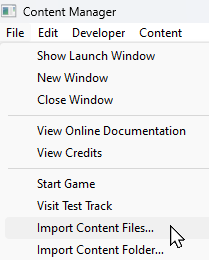
The Import methods ( and  ) listed above will install the selected asset(s) but Content Manager will NOT search for any of their dependencies on the DLS. Selecting these options can result in assets having the message Missing dependencies added to their status labels (see the  Missing Dependencies section below). You must manually find these missing dependencies yourself. |
Content Manager Status |
|
 |
|
|
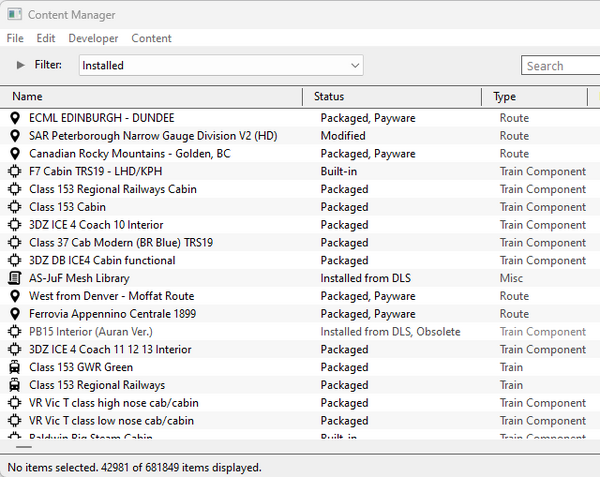
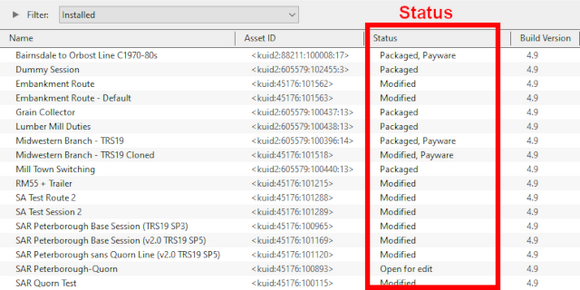
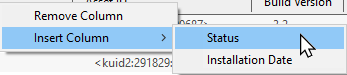
| Start Content Manager by clicking Manage Content from the Trainz Launcher. The Status column in the Content Manager display gives information about each listed asset - its location, availability, and "currency" (installed, obsolete, modified, Payware, unknown, etc). |
 |
|
|||||||||


|
||||||||||
 |
Notes: It is important to remember that:-
|
|||||||||||||||||
|
Status Label Qualifiers |
|
|
|
|
 |
Status labels can have qualifiers added that provides additional information about each asset |
|
Two of the most common qualifiers are Newer version available and Obsolete |
|
||||||||||||
Newer Version Available
|
|

 |
You can download and install the newest (latest) version by a Right Click on the asset and select the option Download from the popup menu. Any versions of the asset, including the one selected, that are are not the newest version will be ignored and Content Manager will locate and download only the newest version. If the latest version was installed it will be relabelled as Installed from DLS with no further qualifier. If an earlier version was installed it will be relabelled as Installed from DLS, Newer version available |
|
You can ignore the newest version to download and install the selected version by a Right Click on the asset and select the option Download this version from the popup menu. Any newer version of the asset that exists on the DLS will be ignored and Content Manager will only download and installed the selected version. The installed asset will be relabelled as Installed from DLS, Newer version available |
|
||||||||||||||||||





Obsolete
|
|

|
If the selected obsolete asset is also showing the label Available for download then this specific obsolete version is not installed on your system but it is possible for you to download and install it if you need it - use the Download this version option described in the Newer Version Available section above - after it has been installed it will be relabelled as Installed from DLS, Obsolete. The latest updated version that is already installed on your system will not be affected by this change |
|
Obsolete Installed from DLS and Modified assets can be deleted |
|
Obsolete Packaged and Payware assets cannot be deleted using Content Manager. You must use the Content Store instead but this will delete the entire DLC package that contains these assets - see Deleting Packaged and Payware Assets below |
|
Obsolete Built-in and Base assets cannot be deleted |
Available for Download |
 |
|
|
|
|
|
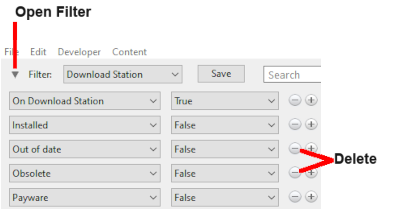
Available for Download simply means that the asset is on the DLS and is not already installed on your system |
The Status labels that you may see would include:-
|
|
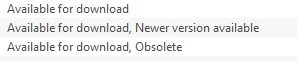
| Available for download | This version is available on the DLS and it is not already installed. This version IS the latest version available. If you are looking to install a new asset or update an existing one to the latest version, then this is the one you would normally select |
| Available for download, Newer version available | This version is available on the DLS and it is not already installed. It is NOT the latest version available. There is an updated version available on the DLS but you can still download and install this older version if it is required |
| Available for download, Obsolete | This version is available on the DLS and it is not already installed but it is Obsolete because you already have a more recent version installed but you can still download and install this older obsolete version if it is required |
|
||||||||||||||||||||
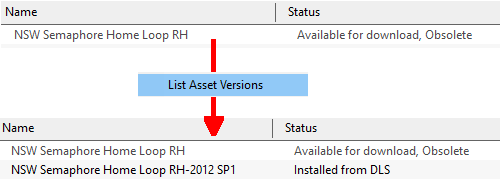
Create an "Available for Download" Filter |
|
 |
|
|||||||||||||||||||||||||


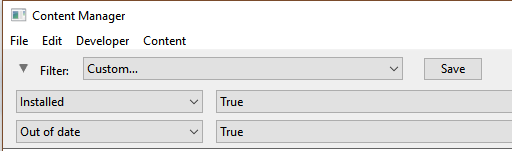
Create an "Updates Available" Filter |
|
|
|
||||||||||||||||
Installing the Latest or an Older Version of an Asset |
|
|
|
To Install the Latest Version: You can select the version that is labelled Available for download with no other qualifier (Obsolete or Newer version available) or you can select ANY Available for download version (including those marked as Newer version available and Obsolete) and Content Manager will download and install only the latest version. |
|
||||||||

|
To Install a Specific Older Version: You can download and install an earlier version of an asset (one that also has the label Newer version available or Obsolete) if you don't want the latest version. |
|
||||||||||

|
||||||||



Installed |
|
|
|
|
|
|
| This built-in search filter will show all the assets that are installed in Content Manager. Set the Content Manager search filter to Installed. The Status labels that you may see would be:- |
|
|
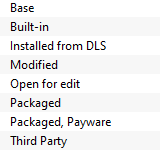
|
|
|||||||||||||||||||||
Base, Built-in |
|
|
You will often see the following labels on installed assets:-
|
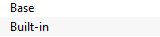
Base and Built-in The asset was installed when Trainz was installed on your system. When you installed your current version of Trainz, or do a reinstall, the Base and Built-in assets will be the only ones installed. All the other assets have to be manually added later from the DLS, DLC or other sources. Base and Built-in assets can also have the label Newer version available which means that an update is available |
|
|

Installed from DLS |
|
|
You will often see the following label on installed assets:-
|
Installed from DLS You have downloaded and installed the asset from the DLS. You may have performed this manually by selecting and downloading the asset or it was downloaded and installed automatically as a dependency of another asset that you have manually selected and downloaded from the DLS, for example a route. Installed from DLS assets can also have the label Newer version available which means that an update is available. They can also have the label Obsolete which means that you already have the updated version of the asset installed |

Modified |
|
|
You may often see the following label on installed assets:-
|
Modified You have created, altered or cloned the asset, or not installed it directly from the DLS. |

This label will appear on all assets that you have:-
|
created yourself (it will have your kuid code) |
|
modified from an installed asset |
|
cloned from an installed asset (it will have your kuid code) |
|
imported directly into Content Manager without using the Download option - as a result Content Manager will not know the source of the asset |
Open for Edit |
|
|
|
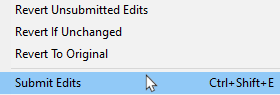
Open for edit The asset is currently in use by another process such as Surveyor, Driver or Content Manager. |

|
|
|||||||||||||||
|
Packaged, Payware |
|
|
If you have installed routes or other assets from the DLC then you see the following label or labels on installed assets:-
|
Packaged and Packaged, Payware The asset has been installed as part of a DLC package. Packaged and Payware assets can also have the label Newer version available which means that an update is available |
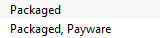
Both labels mean that the asset was included in a DLC package that you have downloaded and installed.
|
Packaged by itself means that the asset can be cloned and modified for your personal use. Many, but not all, Packaged assets will also be found on the DLS |
|
Payware means that the asset is exclusive to a DLC package and will not be found on the DLS. Some Payware assets are encrypted and cannot be cloned or modified |
| It is up to the creator of a DLC package to decide if an asset they have created will also be available on the DLS, or if it will be encrypted. See the Packaged and Payware section below for more information. |
|
|
Third Party |
|
|
You may occasionally see the following label on installed assets:-
|
Third Party The assets availability is "questionable". It may be best to avoid using until its status is resolved. |

| This will appear on assets that:- | |||||||
|
you have uploaded to the DLS but they have not yet been approved for distribution. Usually it takes 24 hours (sometimes more) before approval is given. After approval the Third Party label will be changed to Installed from DLS | ||||||
|
have been removed from the DLS listing, or are not shown in the listing, for a variety of reasons including:-
|
||||||


|
||||||
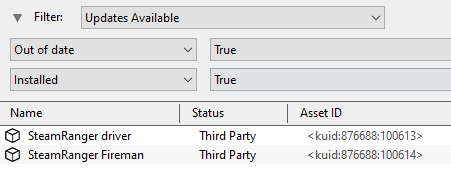
| Sometimes a Third Party asset will be updated by a new version that is available on the DLS. Installing the update will add Obsolete to the status of the original Third Party asset and the new version will have the status Installed from DLS. |
|
||||||||||||

Disabled |
|
|
You may occasionally see the following label on installed assets:-
|
Disabled The asset has been manually Disabled (from the Content menu select Disable or Hide depending on your version of Trainz). The label will be added to an existing label on the asset (e.g. Packaged, Disabled) and the words will be "grey" not black. |

|
Disabling assets will "hide" them from other assets, including Routes and Sessions, so they cannot be used. It is a useful technique for deleting troublesome assets from a Route or Session without actually deleting the assets themselves. For an example of this see the Trainz Wiki Page at  Deleting Stubborn Scenery Assets. |
|
Normally you would restore (Enable) the Disabled assets after removing them from the Route or Session. |
|
Payware assets that are Disabled will have Payware (not active) as their status label. |
Unknown, Incompatible, Not Installed/Not Active |
|
|
|
|
|
|
| Set the Content Manager search filter to All Content and click the Status column heading (once or twice) to sort the very long list according to their Status labels. Scroll down the list and you may see the following Status labels:- |
Unknown Location
|
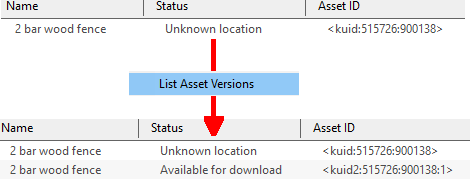
Unknown location The asset is listed but it is unavailable on the DLS. It may be part of a DLC package |

|
If the Status label Obsolete appears with Unknown location then a later version of that missing asset is already installed in Content Manager |
|
|||||||
|
|
|||||||||||||||||||||

Incompatible |
|
|
|
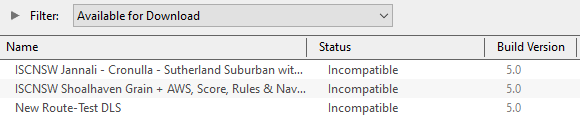
Incompatible The asset is designed for a more recent version of Trainz than you are currently using. |

| For example: The SP4 versions of TRS19 and Trainz Plus will load Routes and Sessions with asset build numbers up to and including 4.9. Routes and Session with build numbers 5.0 and above will be labelled Incompatible and will need a later Trainz version (for example TRS19 SP5 for build 5.0 or TRS22/Trainz Plus for build 5.1) to be loaded.
"Trainz-build"_number |
|
|||||||||||
Not Installed/Not Active |
|
|
|
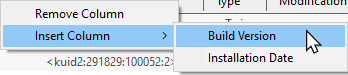
Not installed, Payware (not active) The asset is in a DLC package and must be installed using the Content Store option from the Trainz Launcher |

| This status label can appear if you uninstall an original DLC package (e.g. a Route) that you have cloned to create a new modified version for your own use. The (not active) label will appear on your cloned copy. Most Payware assets can be cloned but conditions apply. See
|
Unknown Asset |
|
|
|
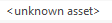
An <unknown asset> can appear when using the List Asset Versions or the List Dependencies options on a selected asset. |
The label "<unknown asset>" will be shown in the Name column and the Status column will be blank.
|
unknown asset The asset cannot be found on your system or on the DLS. |
|
||||||||||
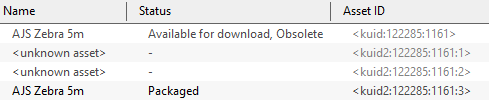
| Apart from the example above, unknown assets are almost always dependencies of other assets that you have downloaded and installed. The installed assets would be labelled has having Missing dependencies. See the Missing Dependencies section below. |
|
||||||||||
|
| The unknown asset may:- | |
|
be from an independent (3rd party) web site |
|
have been made by the same creator as the dependant asset but was not uploaded to the DLS |
|
have been removed from the DLS for some reason (a rare event but it does happen) |
|
simply not exist, anywhere |
| Fixing this may not be easy. Possible solutions are:- | |
|
There is a very long thread in the Trainz Forum where you can find posts looking for missing/unknown assets. See Missing kuids? Post them here |
|
You can try contacting the creator via email (their address may be in the config.txt file) or by a Direct Message through the Trainz Forum |
| Neither is a guaranteed solution. | |
| If the unknown asset is in a Route or a Session then a third option is to select Delete Missing Assets from the Tools menu in Surveyor (in the latest Trainz Plus and TRS22 releases, this is in the Validate Route Data option in the Tools menu), but make a backup copy of the Route or Session first. |
Packaged and Payware |
|
|
|
|
|
|
|
Packaged assets are installed from DLC packages and may also be available on the DLS or elsewhere |
|
Payware assets are exclusive to DLC packages or other payware sites (see Notes: below) |
|
DLC packages can only be installed, updated and uninstalled using the Content Store from the Trainz Launcher |
All new DLC packages downloaded and installed from the Content Store now contain ALL the required dependencies in the download package. This includes any assets that are on the DLS or on independent web sites that in the past would have to be downloaded separately from the DLS or elsewhere. This means that all the assets are now in a single package that will be downloaded at the maximum possible speed your internet connection will allow even if you do not have an FCT (First Class Ticket). Older DLC packages are currently being converted to this system.
|
|
|
Installing Packaged and Payware Assets |
|
|
|
Packaged and Payware assets can only be installed by installing a DLC package using the Content Store from the Trainz Launcher |
|
||||||||||||||||||||||
|
||||||||||||||||||||


Deleting Packaged and Payware Assets |
|
|
|
Packaged and Payware assets can only be deleted by Uninstalling the DLC package that installed them |
|
||||||||||||||||
|
||||||||||||
Packaged and Payware Status Labels |
|
|
Some of the Status labels that can appear on Packaged and Payware assets are:-
|
|
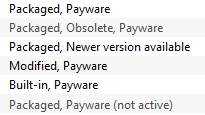
|
|
|||||||||||||||||||||
|
|
||||||||||||||||
|
||||||||||||||||||||||||||
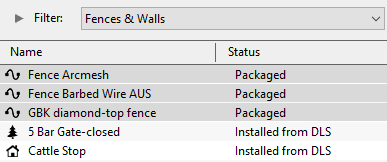


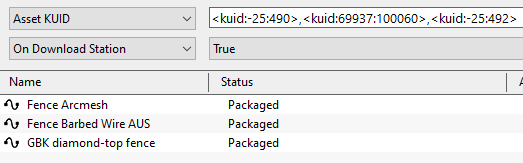
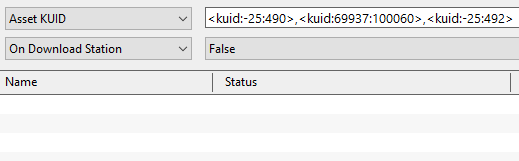
Updating Packaged and Payware Assets |
|
|
|
Packaged and Payware assets can be made obsolete by a newer version of the same asset appearing on the DLS |
|
these updates can be downloaded and installed from the DLS |
| Consider the following examples:- | |||||||
| After running the Updates Available filter (see Create an Updates Available Filter above) the following list of assets is displayed:- |
|||||||
|
|||||||
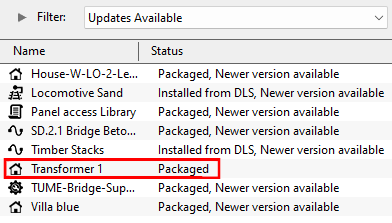
|

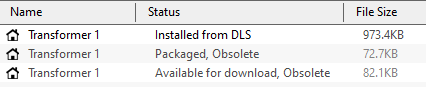
The following situation can also occur with Packaged and Payware assets.
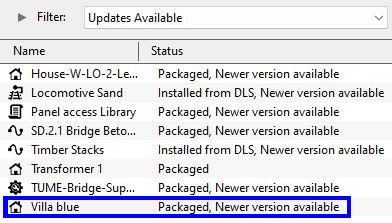 |
|
|||||||||
|

Modifying and Sharing Payware |
|
|
|
Some DLC assets cannot be modified |
|
Most DLC routes (and sessions) can be modified but the original must always be present and active on your system |
|
Modified DLC routes (and sessions) can be uploaded to the DLS and used by those who also have the original present and active on their system |
|
DLC routes, including modified ones, cannot be merged with other routes |
| It is possible to modify a DLC (payware) route or session and upload it to the DLS provided the creator of the route allows this to happen. There are some conditions that apply:- | |
|
Some DLC assets are encrypted and cannot be cloned or modified |
|
Your modified route or session will be saved as an alias of the original and, provided the original remains on your system (i.e. it is not deleted or disabled), then your modified copy will work |
|
You can upload a modified DLC route or session to the DLS (again, if the creator allows this) for others to download and use but they must also have the original unmodified route (and session) installed on their system |
|
It is NOT possible to merge a DLC route, or a cloned DLC route, with another route (payware or freeware) as this will remove the payware protection from the route |
These restrictions are to protect the rights and intellectual property of the payware creators.
|
|

Using Packaged Assets in Routes Uploaded to the DLS |
|
|
|
Packaged assets can be used in routes and sessions that you upload to the DLS provided the asset is also on the DLS or is already installed as Packaged by users who have downloaded your route or session |
| An asset will be labelled as Packaged if it part of a DLC package that you have installed. It may also be on the DLS or a 3rd party web site. The same asset can be in both a DLC package and on the DLS and its status will be labelled according to how it was installed. |
|


Using Different Versions of the Same Asset
| Complications can occur if a Packaged asset has been updated to a newer version but the DLS version has not been updated to the same version. That is usually a decision made by the content creator. |
|
|
||||||||||||||||||||||


Faulty |
|
|
|
|
|
| This label can appear on any asset that:- | |
|
you have incorrectly modified so that it now has an error |
|
has been installed from the DLS or elsewhere but contains errors |
|
Faulty The asset has an error or errors that will prevemt it from either loading into Trainz or working correctly if it does load |

The causes of this can be many. A few common examples:-
|
||||||||||||||||||||

|
||||||||||||||||||
The first step in repairing a faulty asset, if it is possible, is to identify the cause of the fault
|
||||||||||||
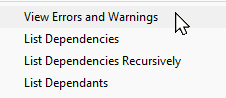
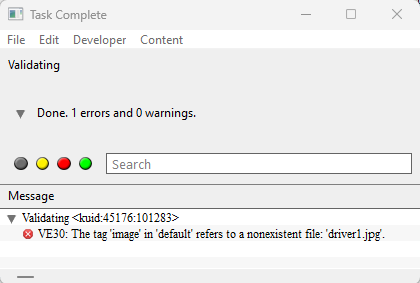
Missing Dependencies |
|
|
|
|
| Missing Dependencies can occur when an asset:- | |
|
has been installed from a .cdp file (e.g. from a 3rd party web site) or from a folder (e.g. on your HD) without also installing other assets it requires |
|
has dependent assets that have been deleted or disabled in Content Manager |
|
has been downloaded from the DLS but contains dependency assets that are not on the DLS or built-in |
This is a label to be avoided if possible.
|
Missing dependencies The asset relies on the presence of other assets (dependencies) that must be installed on your system and at least one of those assets has not been installed or has been disabled. |

| See the Trainz Wiki Page How to Deal with Missing Dependencies for more details and options than shown in the summary provided here. |
|
||||||||||||||
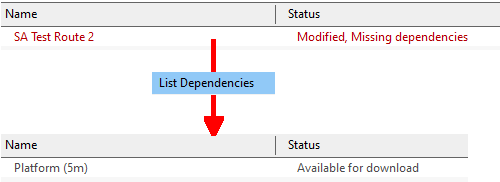
This situation shown in the example above can occur if you have:-
|
deleted the asset without realising that it is needed in other assets, such as a Route or a Session, OR |
|
used the Import option to install the asset from a .cdp file or a content folder - Content Manager will not search for and install missing dependencies when you import an asset. |
If you have imported an asset from a .cdp or content folder and see the Missing dependencies label then:-
|
||||||||
|
||||||||||
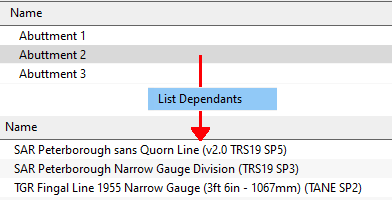
|
|
Trainz Wiki
|
|


This page was created by Trainz user pware in January 2022 and was last updated as shown below.
