How to Restore Deleted Assets
From TrainzOnline
| The information in this Wiki Page applies to TRS19, Trainz Plus and TRS22 and describes the methods that can be used to restore assets deleted by Content Manager. |
 |
 |
|

Restore Deleted DLS Assets |
 |
|
|
 |
Deleted assets that were originally Installed from DLS can be easily restored by installing them again from the DLS |
| Deleted assets that were installed from the DLS are the easiest of all to restore. Simply use Content Manager to locate the assets and download them again. | ||
| Error creating thumbnail: /bin/bash: line 1: /usr/bin/convert: No such file or directory Error code: 127 | Select the Download Station filter from the Filter drop down menu | 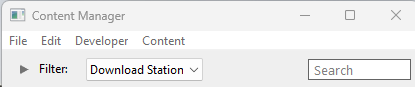 |
| Error creating thumbnail: /bin/bash: line 1: /usr/bin/convert: No such file or directory Error code: 127 | Optional: Type part of the asset name in the Search box to narrow the search | |
| Error creating thumbnail: /bin/bash: line 1: /usr/bin/convert: No such file or directory Error code: 127 | Right Click on the asset name in the displayed list and select the Download option | |
However, if for some reason you are unable to access the DLS and the deletion occurred during the last 7 days, then the assets can still be recovered from the automatic backups that Content Manager creates when assets are deleted. These backups are only held for 7 days. See  Restoring Assets from the Backup for the details. |
||
Restore Deleted .cdp File Assets |
|
 |
|
|
|
Deleted assets that were installed from .cdp files can be easily restored by reinstalling them from the same .cdp files |
Restore Deleted Payware and Packaged Assets |
|
|
|
|
|
Payware and Packaged assets that were installed from a DLC package can be restored by reinstalling the same DLC Package |
|
If a Packaged asset is also on the DLS then it can be restored from there |
|
|
Trainz Wiki
|
|


This page was created by Trainz user pware in April 2025 and was last updated as shown below.

