Help:Surveyor World Clock
From TrainzOnline
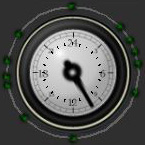 Diurnal Clock

The Clock allows you to view different parts of the diurnal (day/night) cycle by selecting times of day. The green dots around the circumference of the clock are the Time Points that are used to configure the environment settings (ie sky colour, fog density, ambient colour, etc). Select a time point (with the Clock Move Time Point tool selected) to edit the colour and other environment colour options. You can add new time points using the Clock Add Time Point tool; and delete time points using the Clock Delete Time Point tool.
- See Also
