How to Use Track Priority Markers
From TrainzOnline
The information in this Wiki Page applies to both TANE and TRS19.
What are Track Priority Markers?
| In Summary: | |
 |
Track priority markers are purple coloured track markers that are invisible in Driver Mode but visible in Surveyor Mode. They are used to direct specific trains through the track section where they are placed |
|
Track priority markers are NOT a substitute for Driver Commands or Interlocking Towers |
Adding a Track Priority Marker
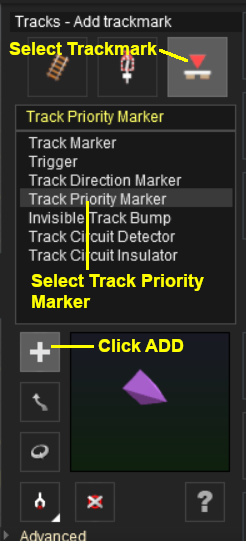 |
|
||||||

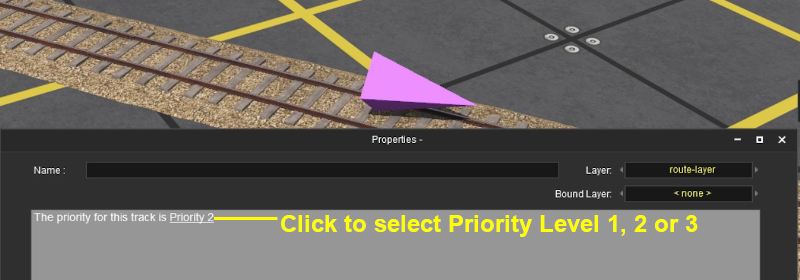
Assigning Priority Levels to Trains
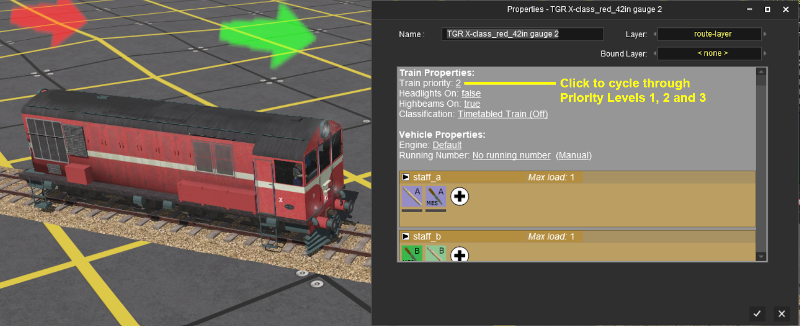
Each locomotive can be assigned a priority level of 1, 2 or 3. Priority 2 is the default level. Again, these values have no set meaning beyond what you decide they will mean.
For example you could assign priority 1 to express trains and 3 to slow general freight stopping trains.
Priority Marker Operation
 |
Priority Track Markers only work on AI controlled trains. They have no effect on manually controlled trains |
|
Priority Track Markers "fool" an AI train that has the same priority level into "thinking" that the path containing the marker is the shortest possible path, even when it is not |
|
If the priority level of the AI train does not match the priority level of a track marker, then the AI will ignore it and select its own path which may be the one containing the priority marker |
|
If the specified path is blocked (e.g. by another train), then the AI will ignore the Priority Track Marker and find another path |
Trainz Wiki
 |
More Tutorials and Guides to Using Trainz |
