How to Use S20 Tools
The information in this Wiki Page applies to Surveyor 2.0 (S20) as found in Trainz Plus.
This document is under development
|
|||||||||

The Tools Palette
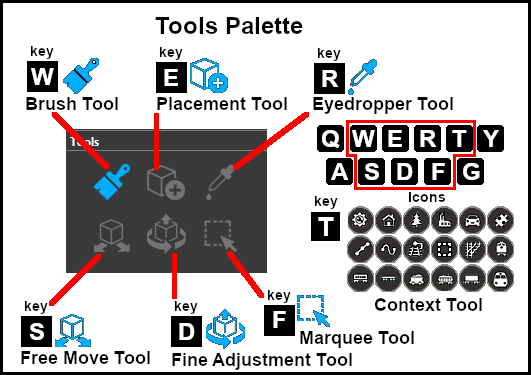
The Brush Tool
 |
Keyboard Shortcut: W |
The Brush Tool is used for painting the landscape. It can:-
- adjust the height of the terrain
- add ground textures
- add Effect Layers
- add Scrapbook scenes
The Placement Tool
 |
Keyboard Shortcut: E |
The Placement Tool is used to add assets to the landscape.
The Eyedropper Tool
 |
Keyboard Shortcut: R |
The Eyedropper Tool is used to identify (and select) objects that are in the landscape. The objects can be textures, effect layers, scenery and splines.
The Free Move Tool
 |
Keyboard Shortcut: S |
The Free Move Tool is used to move objects in the landscape.
The Fine Adjustment Tool
 |
Keyboard Shortcut: D |
The Fine Adjustment Tool is used to make fine adjustments (XYZ axis, rotation, tilt) to objects in the landscape.
The Marquee Tool
 |
Keyboard Shortcut: F |
The Marquee Tool is used to select areas of the landscape.
 |
 |
 |
|
 |
Trainz Wiki
 |
More Tutorials and Guides to Using Trainz |
This page was created by Trainz user pware in January 2023 and was last updated as shown below.
