|
The information in this Wiki Page applies to TANE, TRS19, Trainz Plus and TRS22. It gives practical examples of how to use the Message Popup Rule in Sessions to create messages that appear after an event and automatically close after another event. |
|
|
 |
For information of how to configure the Message Popup Rule in Trainz, see the Trainz Wiki Page at:-
|
|
Application 1: Timed Message
 |
The Scenario:
|
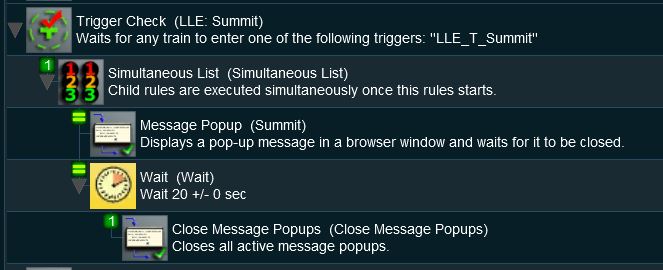
A Message Popup is activated by a track trigger event and is automatically closed by a timed event.
 |
Rules Used:
|
 |
Session Editor Screenshot:
|
 |
Description:
|
Application 2: Navigation Point and Train Stopped Event Message
|
The Scenario:
|
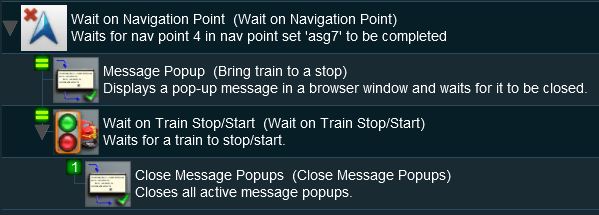
A Message Popup is activated by a navigation event and is automatically closed by a train stopped event.
 |
Preconditions:
|
The Navigation Display Rule is used to create the navigation point set.
|
Rules Used:
|
|
Session Editor Screenshot:
|
|
Description:
|
| Error creating thumbnail: /bin/bash: line 1: /usr/bin/convert: No such file or directory Error code: 127 |
Line 1: Wait on Navigation Point The event is triggered when a consist reaches a preset navigation point. This rule executes all its child rules simultaneously so no Simultaneous List Rule is required in this example
In this example, the Close Message Popups Rule could be replaced by lines 2, 3, 4 and 5 from the Timed Message example shown above to produce a new message when the train stops moving and that message would be closed after a set time interval.
|
|
Information of setting and using Navigation Points can be found on the Trainz Wiki Page at:-
|
Trainz Wiki
 |
More Tutorials and Guides to Using Trainz
|
This page was created by Trainz user pware in April 2018 and was last updated as shown below.