How to Control Junctions in Sessions
From TrainzOnline
|
|


The following applications give examples of using Session Rules to control junctions.
Application 1: Presetting Junctions |
 |
 |
 |
 |
The Scenario: |
| When a consist reaches a trigger, the junctions ahead are set and configured (e.g. locked/unlocked, AI control allowed/disallowed) |
 |
Session Editor Screenshot: |
 |
 |
Description: |
Line 1 : Trigger Check The event is triggered when the consist reaches a trigger. This executes the following rule:-
For example:- 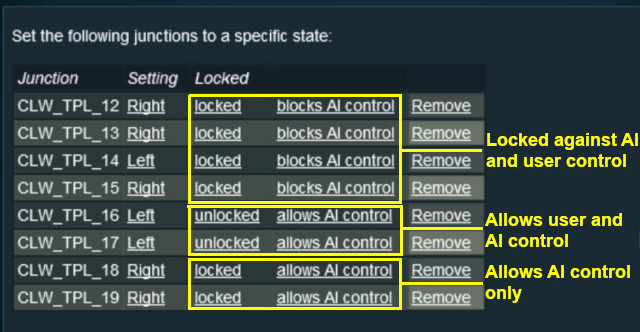 |
Application 2: Asking the User to Set Junctions |
|
 |
|
|
The Scenario: |
| A consist has been halted at a trigger placed in front of a junction. The user will be asked to set that junction and the following junction before the consist can proceed |
 |
Preconditions: | |
| Error creating thumbnail: /bin/bash: line 1: /usr/bin/convert: No such file or directory Error code: 127 | Navigation Display Rule to create a navigation point set | |
 |
Rules Used: | |||||||
|
|
Session Editor Screenshot: |
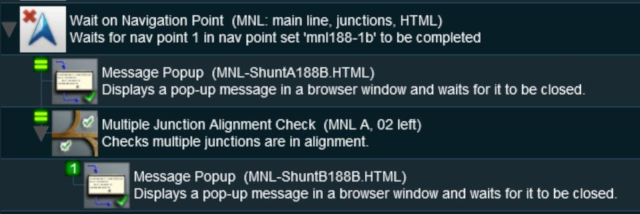 |
|
Description: | ||
Line 1 : Wait on Navigation Point The event is triggered when the consist halts at the navigation point assigned to the trigger. This executes the following rules simultaneously:-
|
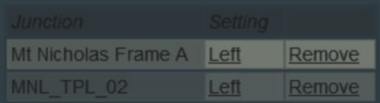
|
|
Trainz Wiki
|
|


This page was created by Trainz user pware in May 2018 and was last updated as shown below.


