How to Control Junctions in Sessions

From TrainzOnline
Jump to navigationJump to search
Error creating thumbnail: /bin/bash: line 1: /usr/bin/convert: No such file or directory Error code: 127 The information in this Wiki Page gives examples of how junctions can be controlled using Session Rules with TANE, TRS19, Trainz Plus and TRS22.


Junctions can be controlled by Session Rules during the running of a Session
The level of control includes:-
locking junctions (all or some) against user control
setting junctions according to decisions made by users
checking to see if users have set junctions correctly


The following applications give examples of using Session Rules to control junctions.

Application 1: Presetting Junctions

    Top   Next Down Bottom
The Scenario:
When a consist reaches a trigger, the junctions ahead are set and configured (e.g. locked/unlocked, AI control allowed/disallowed)
Rules Used:
Error creating thumbnail: /bin/bash: line 1: /usr/bin/convert: No such file or directory Error code: 127 Trigger Check Rule to trigger the event
Error creating thumbnail: /bin/bash: line 1: /usr/bin/convert: No such file or directory Error code: 127 Set Junctions Rule to set junctions
Session Editor Screenshot:
Description:
Line  1 : Trigger Check The event is triggered when the consist reaches a trigger. This executes the following rule:-
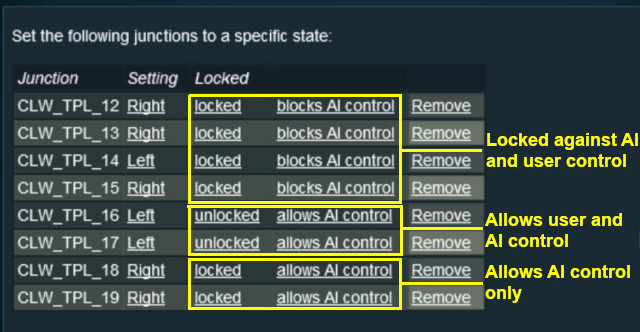
Line  2 : Set Junctions Sets selected junctions to set directions and specifies the level of control by the users and AI

For example:-


Application 2: Asking the User to Set Junctions

    Top Next Up   Bottom
The Scenario:
A consist has been halted at a trigger placed in front of a junction. The user will be asked to set that junction and the following junction before the consist can proceed
Preconditions:
Error creating thumbnail: /bin/bash: line 1: /usr/bin/convert: No such file or directory Error code: 127 Navigation Display Rule to create a navigation point set
Rules Used:
Error creating thumbnail: /bin/bash: line 1: /usr/bin/convert: No such file or directory Error code: 127 Navigation Display Rule to create a navigation point set (in Preconditions above)
Error creating thumbnail: /bin/bash: line 1: /usr/bin/convert: No such file or directory Error code: 127 Wait on Navigation Point Rule to trigger the event
Error creating thumbnail: /bin/bash: line 1: /usr/bin/convert: No such file or directory Error code: 127 Message Popup Rule to open a message window on the screen
Error creating thumbnail: /bin/bash: line 1: /usr/bin/convert: No such file or directory Error code: 127 Multiple Junction Alignment Check Rule to test if specified junctions are set correctly
Session Editor Screenshot:


Description:
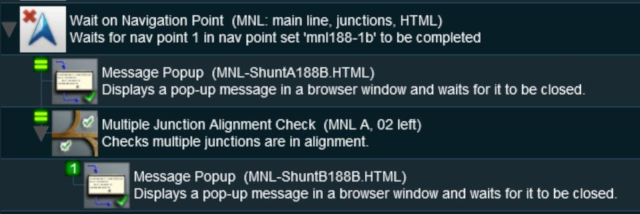
Line  1 : Wait on Navigation Point The event is triggered when the consist halts at the navigation point assigned to the trigger. This executes the following rules simultaneously:-
Line  2 : Message Popup Displays a message window asking that the next two junctions be manually set
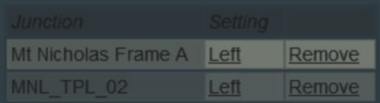
Line  3 : Multiple Junction Alignment Check tests the switch directions of the next two junctions and waits until they are aligned as specified
The following line is executed only if the junctions are set correctly
Line  4 : Message Popup Displays a message window stating that the junctions are now correctly set


  Top Next Up    


Trainz Wiki

More Tutorials and Guides to Using Trainz

Related Links


This page was created by Trainz user pware in May 2018 and was last updated as shown below.